Alpha HW110LC: Troubleshooting No Power - Switch Continuity Test

Created by Gabriel Izzo, Modified on Tue, 26 May at 5:12 PM by Gabriel Izzo

Alpha HW110LC Table Saw · Troubleshooting
No Power — Switch Continuity Test
Applicable Model
Alpha HW110LC (2HP)
Overview

If the HW110LC is not starting, the cause is typically related to one of three things: power not being correctly supplied to the machine, a loose wire connection, or a mechanical failure in the switch or its built-in circuit breaker. This guide walks through a systematic process to narrow down the issue using a multimeter. Recommended to be performed by a licensed electrician or qualified individual.

Electrical Safety
+
This procedure involves working with electrical components and should only be performed by a licensed electrician or qualified individual. Improper handling of live circuits can result in electric shock, serious injury, or death.
+
Always unplug the machine from power before disassembling the switch housing or touching any wiring. The continuity test is performed with the machine de-energized.
+
Use a properly rated multimeter for continuity and resistance testing. Ensure the probes are in good condition with no exposed wiring or damaged insulation.
Dual-Voltage Configuration Note

The HW110LC is a dual-voltage machine. It ships pre-configured for 115V with a NEMA 5-20P plug, a 115V switch with built-in circuit breaker, and the motor wired in the 115V configuration. If you have converted to 230V, verify all of the following before proceeding with troubleshooting:

The 230V switch is installed in place of the 115V switch
The breaker inside the switch is the 220V breaker, not the 115V one that ships pre-installed
The motor wiring has been changed to the 230V configuration
The plug has been changed to a NEMA 6-20P or equivalent
How-To: Switching the HW110LC from 115V to 230V
 
Troubleshooting Steps
1
Reset the Built-In Circuit Breaker & Check Power Supply

Press the circuit breaker reset button on the right side of the switch assembly, then reconnect power and press the green start button. If there is no response at all — no hum, no attempt to start, no chatter — unplug the machine.

Test the outlet with another piece of equipment to confirm it is supplying power. If no other equipment is available, have an electrician verify correct voltage at the outlet: 110–120V for 115V configurations or 208–240V for 230V configurations.

2
Set Up the Multimeter for Continuity Testing

With the machine unplugged, set up the multimeter as follows:

Plug the RED probe into the V/Ohms port
Plug the BLACK probe into the COM port
Set the dial to Ohms / continuity (Ω / o))))
With probes apart the screen should read OL (open line). Touching probes together should produce a low resistance / continuity reading

Remove the three screws on the back of the switch housing to access the switch breaker and switch terminals inside.

3
Test the Circuit Breaker for Continuity

Disconnect the two wire connectors from the breaker. Place the RED and BLACK probes on each of the two pins on the breaker. There should be continuity across both pins.
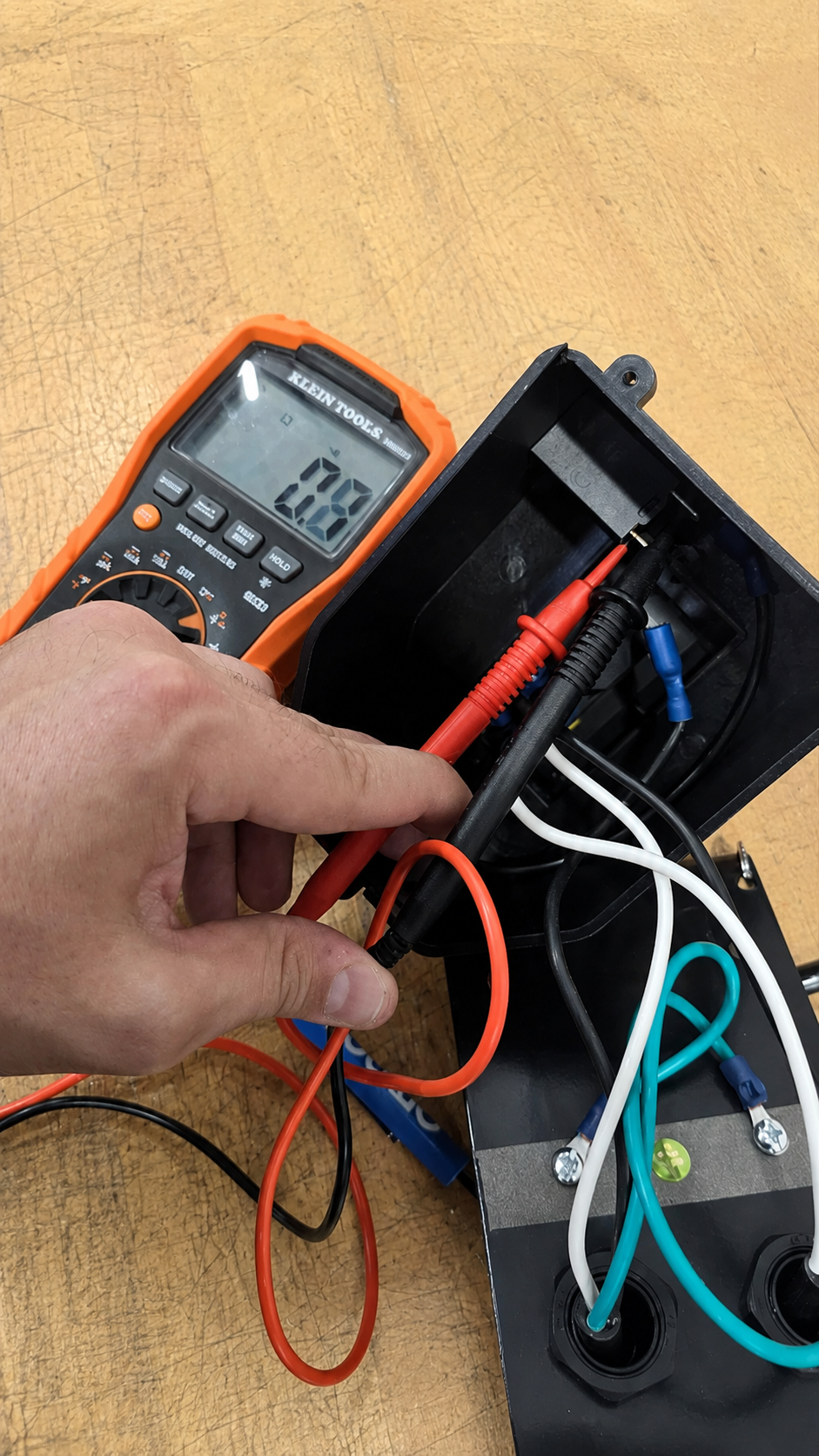
If the wire connectors are difficult to remove from the pins, use pliers to leverage them off from the connector end — do not pull on the wire itself.
Step 3 — Circuit Breaker Continuity Test
Circuit breaker continuity test
Pass
Continuity present — breaker is functional. Proceed to Step 4.
Fail
No continuity — circuit breaker module may be faulty. Note this and continue testing the switch terminals.
4
Test Switch Terminals 23 & 24

Disconnect the two wires from the left side of the switch labeled 23 and 24. Place the RED and BLACK probes on each pin. While pressing and holding the green start button fully in, the multimeter should read continuity. Releasing the button should return an OL reading.
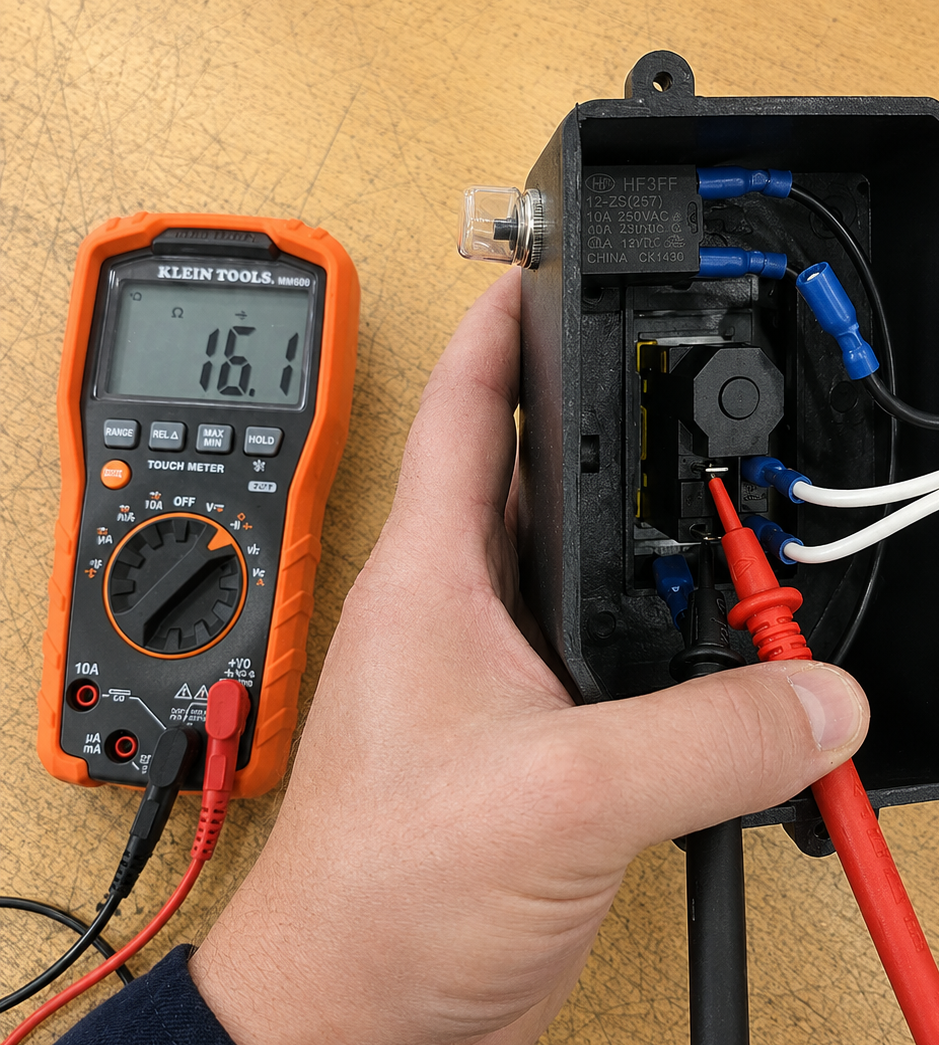
Step 4 — Terminals 23 & 24 Continuity Test
Switch terminals 23 and 24 continuity test
Pass
Continuity with button pressed — terminals 23/24 are functional. Proceed to Step 5.
Fail
No continuity with button pressed — likely a switch mechanism failure. Note and proceed to Step 5.
5
Test Switch Terminals 13 & 14

Repeat the same test on terminals 13 and 14 on the other side of the switch. With the green start button fully pressed, there should be continuity. Releasing the button should return an OL reading.
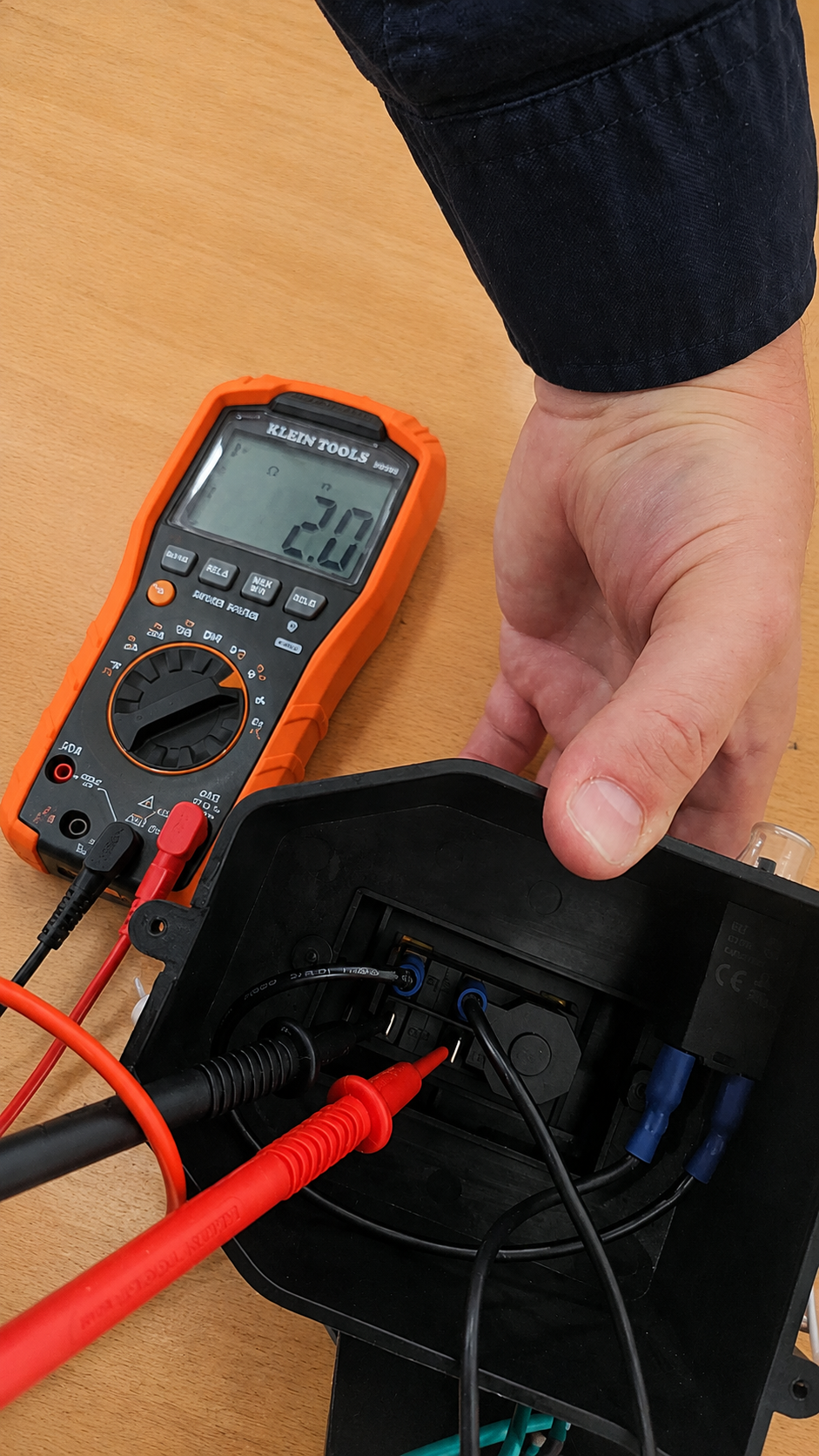
Step 5 — Terminals 13 & 14 Continuity Test
Switch terminals 13 and 14 continuity test
Pass
Continuity on both 13/14 and 23/24 — switch mechanism is functional. Issue is likely elsewhere in the wiring or circuit.
Fail
No continuity on 13/14 or 23/24 — switch mechanism failure confirmed. The switch will need to be replaced.
i

If testing confirms a switch or breaker failure, or if you need assistance ordering a replacement, please contact our support team.

Was this article helpful?

That’s Great!

Thank you for your feedback

Sorry! We couldn't be helpful

Thank you for your feedback

Let us know how can we improve this article!

Select at least one of the reasons
CAPTCHA verification is required.

Feedback sent

We appreciate your effort and will try to fix the article