HW110LC/TC Table Saws: Belt Removal, Installation and Tensioning Instructions

Created by Gabriel Izzo, Modified on Wed, 27 May at 4:57 PM by Gabriel Izzo

Alpha HW110LC / HW110TC Table Saws · Maintenance
Belt Removal, Installation & Tensioning Instructions
Applicable Models
Alpha HW110LC (2HP)
Alpha HW110TC (3HP)
Overview

If you are experiencing any of the following symptoms, the most likely cause is a loose motor pulley belt. Applying more tension to the belt should resolve these issues:

Loss of cutting power, especially when the blade is lowered
Squealing or screeching due to belt slippage
Excess vibration in the motor or pulley belt
Safety — Belt Maintenance
+
Ensure the machine is OFF, unplugged, and fully de-energized before loosening any cap screws or working inside the cabinet.
+
Never place hands or fingers near the belt or pulleys while the machine is running. When testing after adjustment, keep all body parts clear of rotating components to prevent pinching or serious injury.
+
Do not overtighten the belt. Excessive tension puts unnecessary load on the motor and arbor bearings and can cause premature wear or failure.
+
Wear safety glasses when working inside the cabinet — debris or a snapping belt can cause eye injury.
Belt Tensioning Procedure
Saw must be OFF, unplugged, and fully de-energized
1

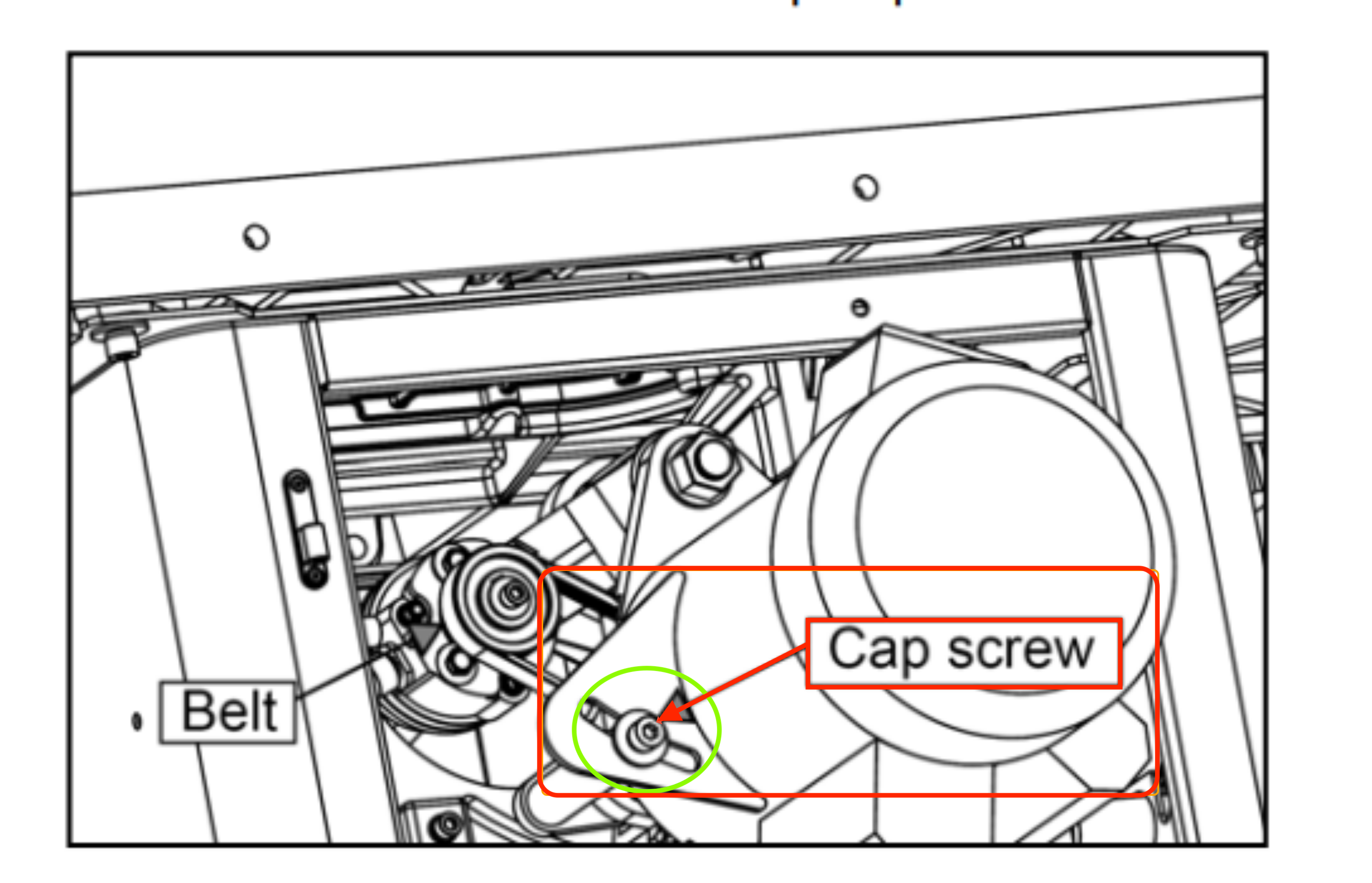
Loosen the cap screw on the motor's belt tensioning point as shown in the diagram below.

2

Apply pressure to the motor until the belt is tight with minimal play. While maintaining pressure, tighten the cap screw to hold the tension.

Start the motor and test for improvement. If symptoms are resolved, no further action is needed.

Belt Tensioning Cap Screw — Location Reference
HW110LC TC belt tensioning cap screw location diagram
If the Issue Persists — Inspect & Clean the Pulleys
1

Loosen the cap screw to release all tension from the belt. Remove the belt and inspect it for any damage, cracking, glazing, or wear. Replace if integrity is compromised.

2

Clean both pulleys with a clean cloth and a degreaser such as acetone or odorless mineral spirits. Grease or oil contamination on the pulleys can cause the belt to slip at startup. Wipe completely dry before reinstalling the belt.

3

Reinstall the belt on the pulleys, apply tension until there is minimal play, and tighten the motor tensioner cap screw to hold the tension.

Start the machine and test for improvement.

Video — Belt Removal, Installation & Tensioning
HW110LC / HW110TC — Belt Removal, Installation & Tensioning
i

For further belt troubleshooting or replacement parts, please contact our support team.

Was this article helpful?

That’s Great!

Thank you for your feedback

Sorry! We couldn't be helpful

Thank you for your feedback

Let us know how can we improve this article!

Select at least one of the reasons
CAPTCHA verification is required.

Feedback sent

We appreciate your effort and will try to fix the article