HW110LC/TC Table Saws: Troubleshooting Blade Height Adjustment is Tight or Gets Stuck

Created by Gabriel Izzo, Modified on Wed, 27 May at 4:07 PM by Gabriel Izzo

Alpha HW110LC / HW110TC Table Saws · Troubleshooting
Blade Height Adjustment Is Tight or Gets Stuck
Applicable Models
Alpha HW110LC-36 (2HP)
Alpha HW110TC-36/52 (3HP)
Overview

If raising or lowering the blade on your HW110LC or HW110TC is difficult or the mechanism gets stuck, there are several potential causes ranging from debris and lubrication to a binding elevation shaft nut or spreader bracket. Work through the steps below in order to diagnose and resolve the issue.

Table Saw Safety
+
Ensure the machine is OFF, unplugged, and fully discharged before attempting any maintenance to avoid electrical hazards.
+
Wear fitted clothing and avoid loose garments, dangling sleeves, or jewelry that could catch on internal components when reaching into the cabinet.
+
Keep hands and fingers away from the blade and moving parts at all times. Always confirm the blade has come to a complete stop before reaching into the cabinet or near the arbor area.
+
Wear safety glasses when cleaning debris, using rust remover, or applying lubricant — fine particles and chemical splatter can cause eye injury.
+
Wear gloves when handling rust removers or protective coatings — these chemicals can cause skin irritation. Ensure adequate ventilation when using chemical treatments.
+
Follow all additional safety guidelines provided in the instruction manual for your model before performing maintenance.
Diagnostic & Repair Steps
Work through in order — stop when the issue is resolved
1
Clear Debris from the Elevation Mechanism

Sawdust and debris can accumulate under the blade elevation mechanism, making it difficult to raise or lower the blade. Use a brush or vacuum to thoroughly clean out any buildup around the mechanism.

2
Lubricate the Elevation Shaft Threading

Apply lubricant to the blade elevation shaft threading. Use a dry lubricant such as WD-40 Specialist Dry Lube, which will not attract sawdust and debris like oil-based lubricants can or alternatively use general purpose grease i.e. Superlube or equivalent if no dry lubricant spray is available.

3
Inspect for Rust

Rust on the elevation mechanism can cause binding. Use a penetrant like WD-40 original or PB Blaster to clean any affected surfaces, then apply a protective coating of dry lubricant or grease to prevent further corrosion (if applicable).

4
Check for Misalignment

Misalignment within the elevation mechanism can cause the blade to bind. Use a straight edge to inspect for visible misalignment and adjust as necessary.

5
Inspect for Worn or Damaged Parts

Visually inspect the elevation mechanism for any worn, cracked, or damaged components. Worn parts may need to be replaced to restore smooth operation.

6
Check for Binding in the Elevation Shaft — Lock Nut (#189)

The elevation shaft is secured at the end with a nylon insert lock nut (#189) which may be over-tightened and causing the shaft to bind.
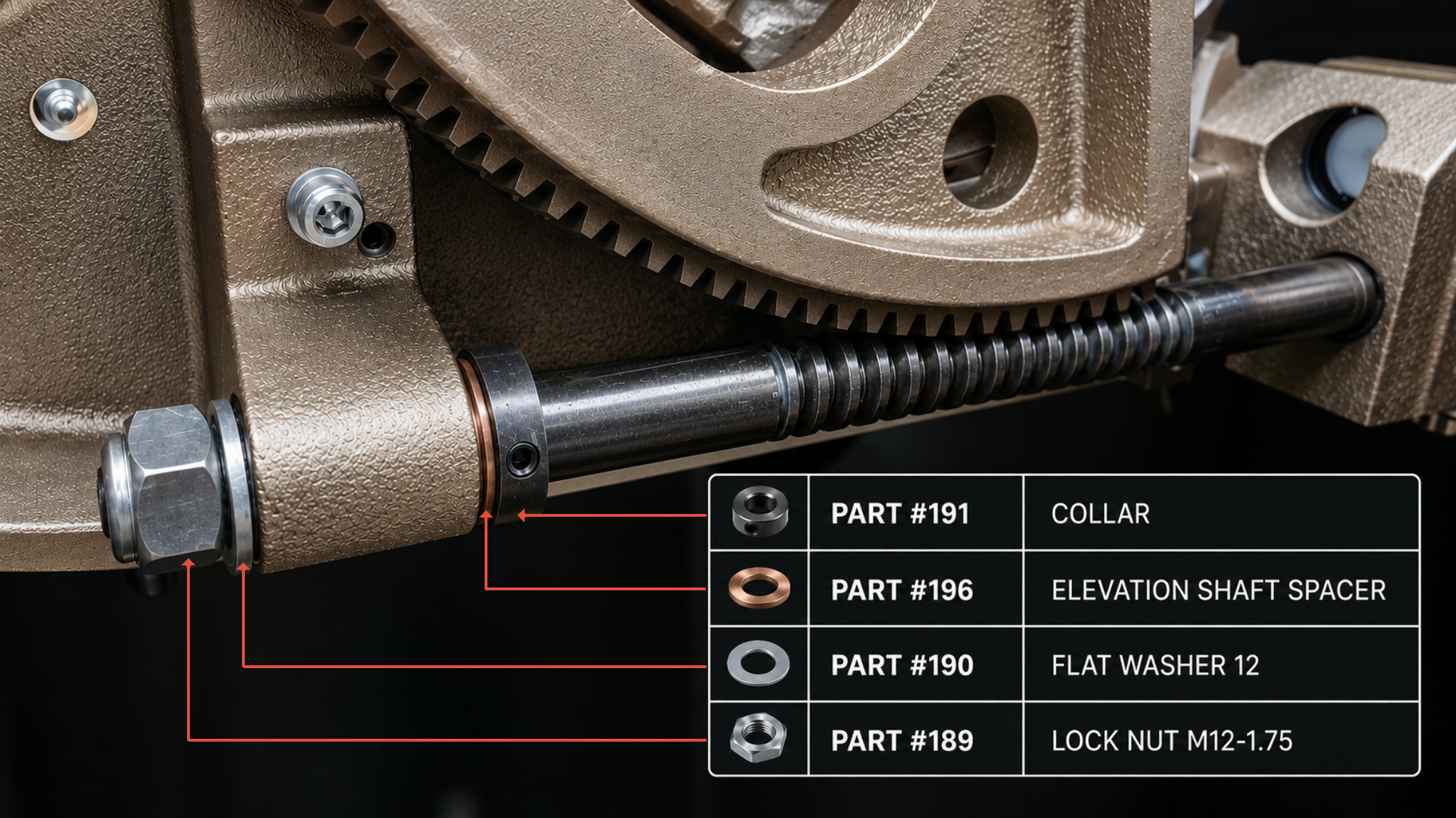
Loosen the nut a half turn or until it no longer binds against the housing and test whether the blade now raises and lowers freely.
If loosening resolves the issue, apply blue Loctite to the threading to hold the nut at the correct position where it is snug but not binding on the end of the shaft. This helps prevent it from vibrating tighter during operation and binding up again due to tightening with the rotation of the shaft.
Elevation Shaft (#192) and Lock Nut (#189) — Reference Diagram
HW110LC TC elevation shaft and lock nut diagram
7
Check the Riving Knife Spreader Bracket for Binding

If loosening the elevation shaft nut does not resolve the issue, the spreader bracket may be too tight, causing the arbor assembly to bind as it self-adjusts when raising and lowering. Refer to the dedicated article below for instructions on adjusting the spreader bracket to eliminate both slop and binding.

HW110LC/TC: Riving Knife Spreader Bracket Adjustment
Step-by-step guide to eliminate slop or binding at the arbor bracket
 
i

If the issue persists after working through all steps, please contact our support team.

Was this article helpful?

That’s Great!

Thank you for your feedback

Sorry! We couldn't be helpful

Thank you for your feedback

Let us know how can we improve this article!

Select at least one of the reasons
CAPTCHA verification is required.

Feedback sent

We appreciate your effort and will try to fix the article