HW110LC/TC Table Saws: Aligning the Table T-slot Parallel with the Blade

Created by Gabriel Izzo, Modified on Wed, 27 May at 5:00 PM by Gabriel Izzo

Alpha HW110LC / HW110TC Table Saws · Calibration
Aligning the Table T-Slot Parallel with the Blade
Applicable Models
Alpha HW110LC (2HP)
Alpha HW110TC (3HP)
Overview

To ensure precise cuts and optimal performance, the table T-slot must be aligned parallel to the blade. This guide walks through how to check the alignment using a combination square and how to adjust the cast iron table position using the M10 corner screws.

Table Saw Safety
+
Disconnect the table saw from its power source before performing any maintenance, calibration, or adjustments.
+
Wear safety glasses throughout this procedure to protect against debris or unexpected tool contact.
+
Keep hands away from the blade when pivoting it during the measurement steps — the blade is sharp even when the machine is off.
+
Wear fitted clothing and avoid dangling jewelry or loose accessories when working around the saw.
+
Read the instruction manual for your specific model and familiarize yourself with the safety features and operational guidelines before performing this calibration.
Alignment Procedure
Tolerance: < 0.2 mm difference between measurements
1
Measure Initial Distance

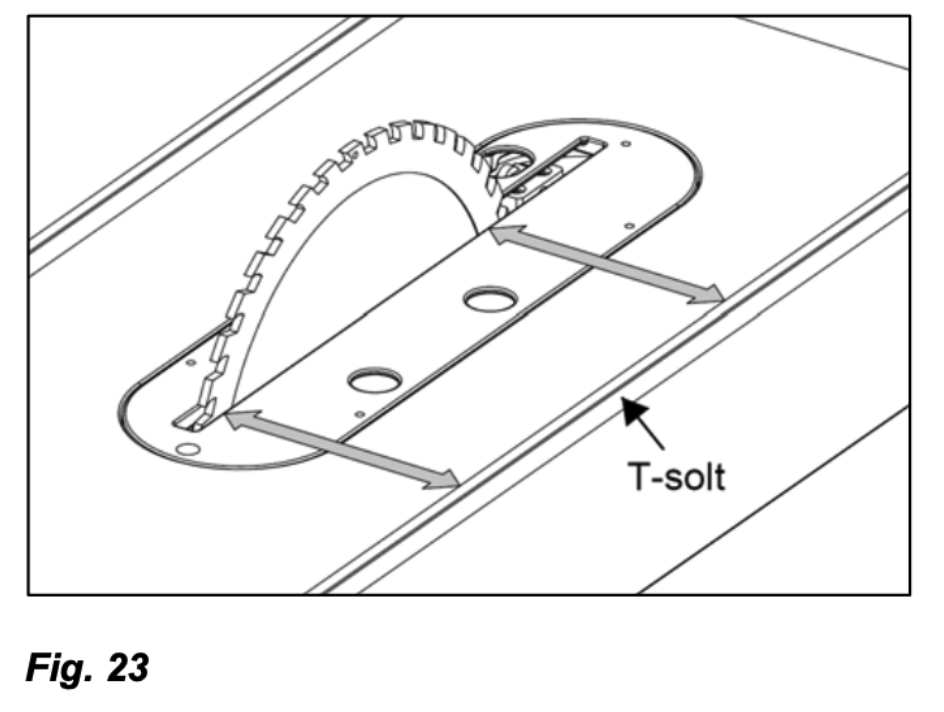
Place a combination square in the table T-slot and measure the distance from the back edge of the blade to the T-slot. Record this measurement.

2
Pivot the Blade 180°

Carefully pivot the blade forward 180° to the opposite position.

3
Measure Again

Using the same point on the blade as the first measurement, re-measure the distance from the blade to the T-slot.

4
Compare Measurements & Adjust if Needed

The difference between the two measurements must be less than 0.2 mm. Any discrepancy greater than this will affect the accuracy of cuts. Refer to Figure 23 in your manual.

Within tolerance
Difference < 0.2 mm — T-slot is parallel. No adjustment needed.
Out of tolerance
Difference ≥ 0.2 mm — table adjustment required. See below.
Fig. 23 — T-Slot Alignment Reference (1 of 2)
T-slot alignment reference diagram figure 23 part 1
Fig. 23 — T-Slot Alignment Reference (2 of 2)
T-slot alignment reference diagram figure 23 part 2
Table Mounting Screws — M10 & M5 Set Screw Explanation

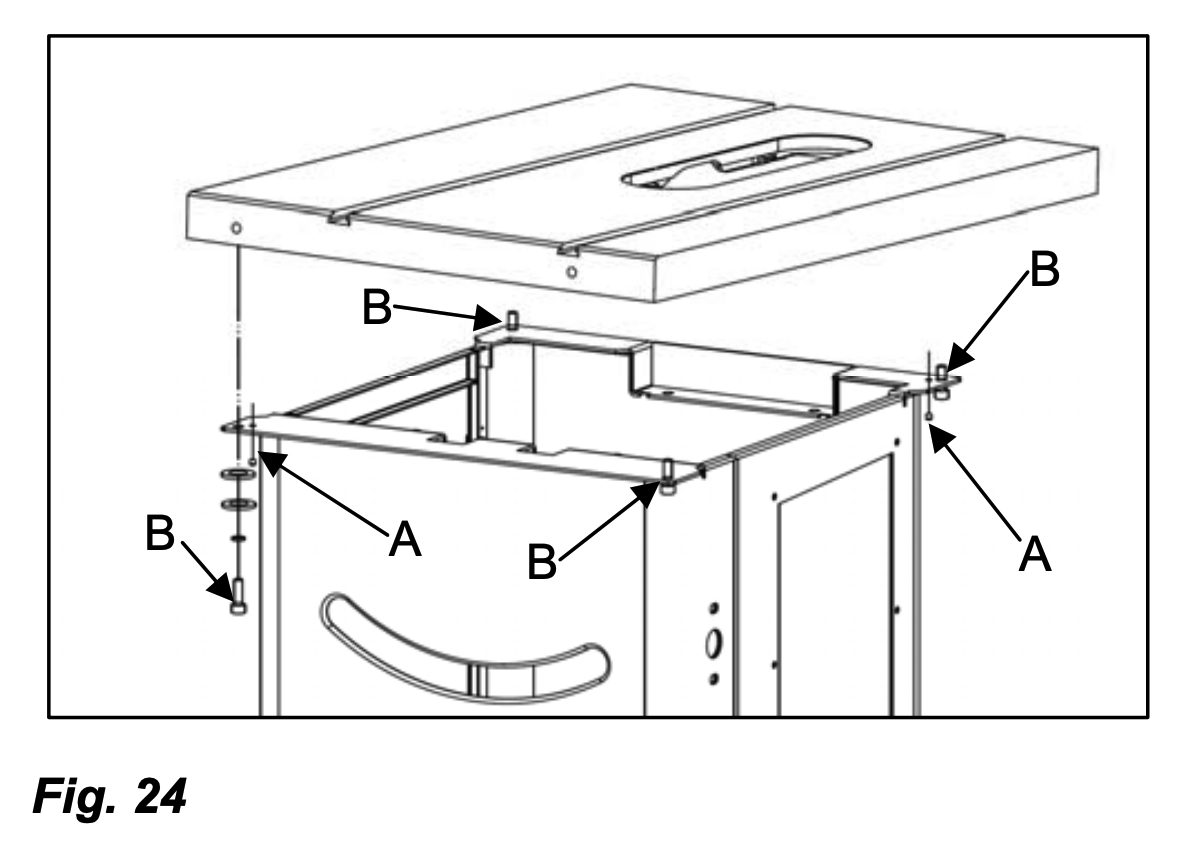
The HW110LC and HW110TC cabinets both use four (4) M10 screws on each corner to secure the cast iron main table to the cabinet, plus two (2) M5 set screws installed on two opposite corners (front-left/back-right or front-right/back-left).

M10 screws (B) — Hold the tabletop to the cabinet in its calibrated position.
M5 set screws (A) — Used to prevent the cast iron tabletop from shifting during transit. These must be removed before adjusting the table position.
Accessing the M5 Set Screws

If the M5 set screws (A) are not accessible because the washers are covering them, loosen the M10 screws (B) completely and remove the washers to gain access to set screws (A).

After aligning the T-slot parallel with the blade, reinstall the four (4) M10 screws (B). The two (2) M5 set screws (A) can be set aside or discarded — they are not required for ongoing operation.
i

For further assistance with table alignment or calibration, please contact our support team.

Was this article helpful?

That’s Great!

Thank you for your feedback

Sorry! We couldn't be helpful

Thank you for your feedback

Let us know how can we improve this article!

Select at least one of the reasons
CAPTCHA verification is required.

Feedback sent

We appreciate your effort and will try to fix the article