Big Eye B-36/B-52 Rip Fence System: Sawstop ICS/PCS Installation

Created by Gabriel Izzo, Modified on Thu, 21 May at 11:40 AM by Gabriel Izzo

Big Eye Rip Fence System · B-36 / B-52
SawStop ICS / PCS — Installation Guide
Applicable Models
Big Eye B-36 / B-52 Rip Fence System SawStop ICS SawStop PCS

The Harvey Big Eye Rip Fence System can be mounted to SawStop ICS and PCS table saws with some modifications required. This guide provides step-by-step instructions to ensure a smooth, precise installation.

Safety — Read Before Beginning
+
Unplug the table saw from the power source before installing or adjusting rails, performing any modifications, or carrying out calibration work
+
Wear safety glasses and hearing protection when drilling into materials. Fragments can cause serious eye injury, and power drill noise levels can cause hearing damage with prolonged exposure.
+
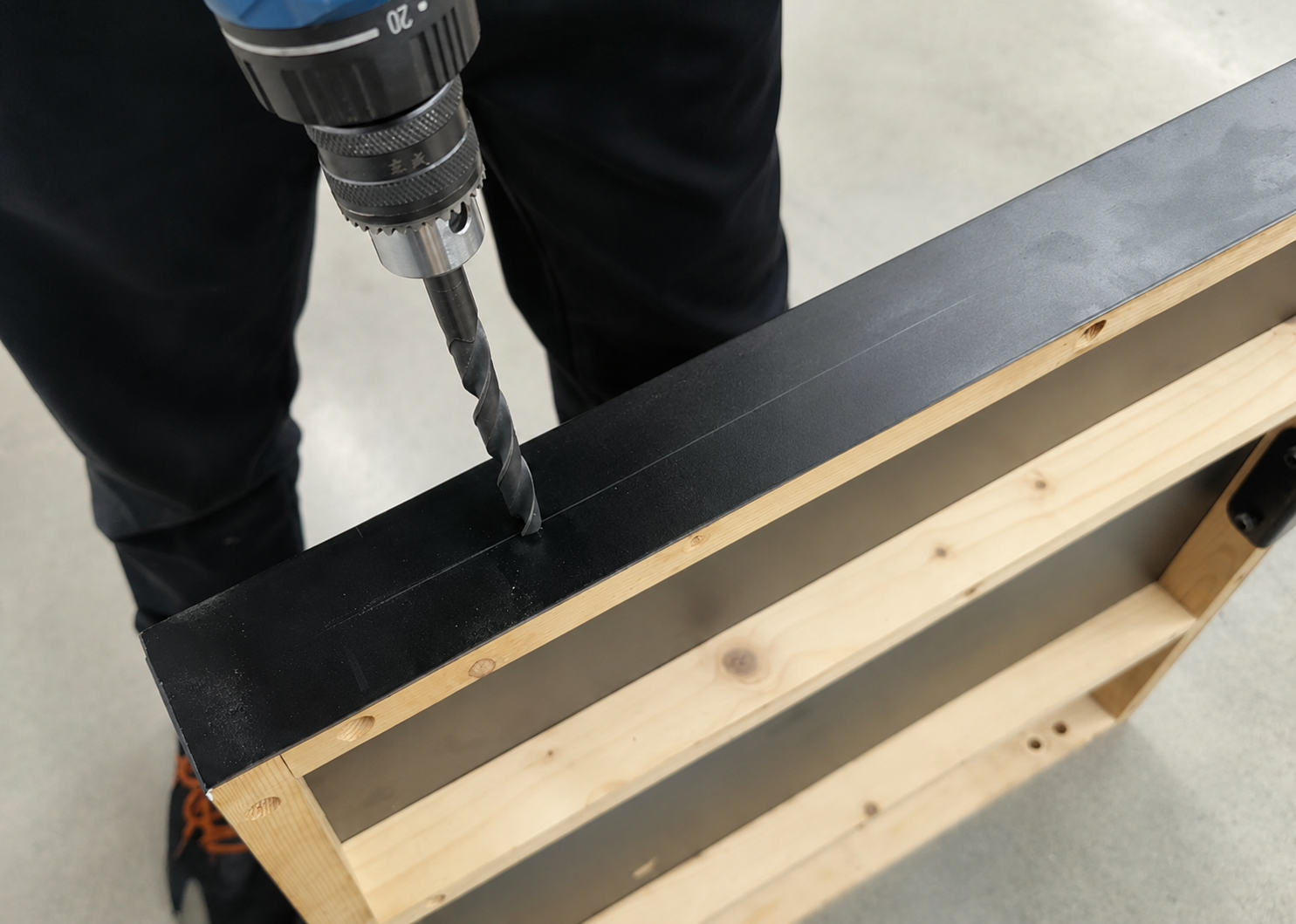
Secure the workpiece before drilling — never hold cast iron wings or table components by hand near a drill bit while drilling. Use appropriate clamps or fixtures to prevent movement.
+
Wear cut-resistant gloves when handling metal or wooden components with sharp edges
+
Double-check all hardware tightness and fence alignment before reconnecting power and resuming operation. An improperly installed or misaligned fence system can create serious kickback hazards.
Extension Wing Width Considerations

SawStop left extension wings are wider than those of the Harvey Alpha Series. This affects how the rails need to be positioned:

ModelLeft Extension Wing Width
SawStop PCS12″
SawStop ICS10″
Harvey Alpha Series7-9/32″

To compensate for the wider wings, the rails can be shifted to maintain the desired 36" or 52" rip capacity to the right of the blade, depending on the model.

Because the Big Eye fence body is T-shaped and wider in the front than the rear, position the rear rail so the rear clamping mechanism remains securely engaged when the fence is moved to the left bumper on the front guide rail.

If the rails are shifted to maximize use of the left table surface (e.g. with a wider left wing), note that rip capacity to the right of the blade will be reduced.

Front Rail
ICS / PCS Front Rail Installation
Over time, SawStop has produced different ICS and PCS versions with variations in rail mounting hole placement relative to the tabletop. Because these changes are not standardized or controlled by Harvey, installation steps may vary slightly between machines. Follow the guidelines below.
1
Verify Hole Height Alignment

Verify that 10 mm diameter through-holes are drilled in perfect vertical and horizontal alignment across the saw, from left to right. This ensures compatibility with the eccentric bolts used for Big Eye rail mounting in the T-track system.

2
Perform a Fit Test

If the original holes in the cast iron wings and extension table are at different heights, perform a quick test fit:

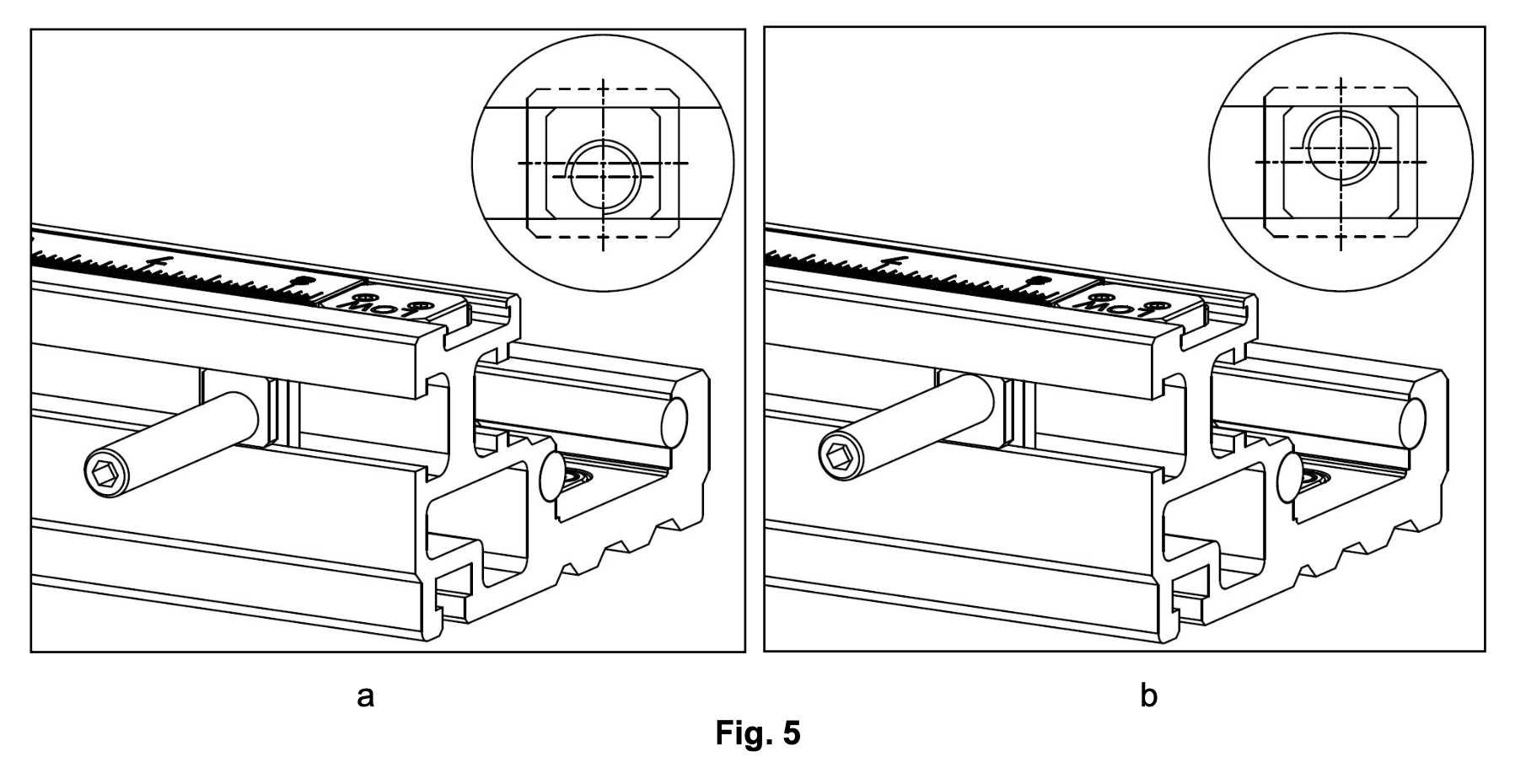
Mount the front rail to the cast iron wings using the eccentric bolts (see Fig. 5b).
Ensure the top of the rail sits 11.5 mm below the table surface (about 1–2 mm below the tabletop's T-slots) to avoid interference.
If the height is correct, drill new holes in the extension table to match the wing hole height.
If no eccentric bolt orientation allows the rail to sit at the correct height, drill new holes in the cast iron extension wings at the height that achieves 11.5 mm below the table surface.
3
Example Scenario

If the cast iron wing holes are positioned 29 mm from the tabletop to the hole center, drill 10 mm through-holes at the same height (29 mm) along the front and rear guide rail mounting surfaces, as shown in Figures 1–4. For a 52" extension table, three holes are recommended.

4
Follow Screw Orientation Details
Use the screw orientations shown in Fig. 5b for the cast iron wings, and those in Fig. 5a for the extension table.
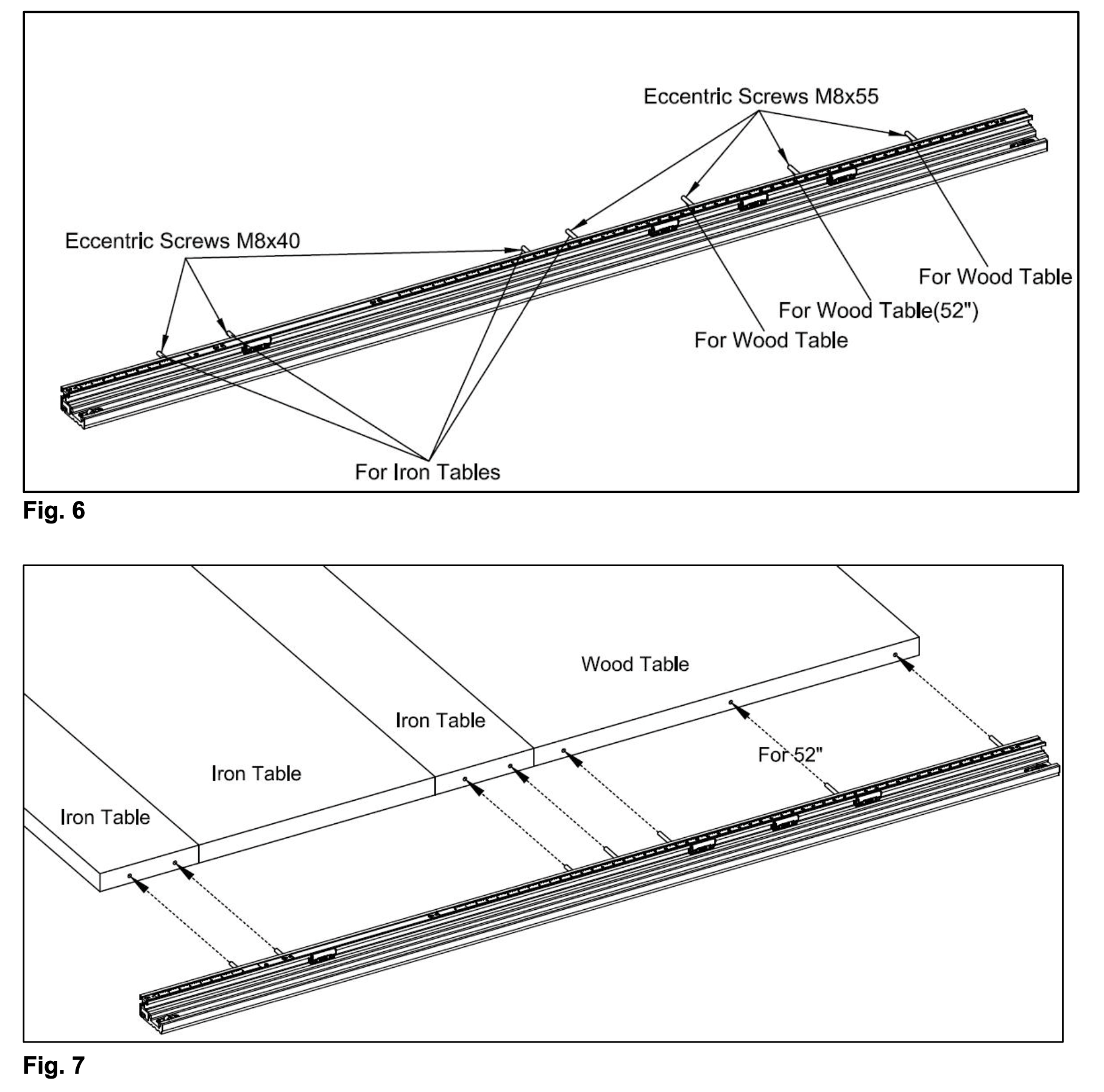
See Figures 6–7 for front guide rail screw specifications and positions.
See Figure 8 for rear guide rail screw specifications and positions.
5
Secure Hardware

Inside the table, install flat washers, spring washers, and nuts, tightening them securely. Maintain a distance of 11.5 mm from the guide rail's top surface to the tabletop, as shown in Fig. 9.
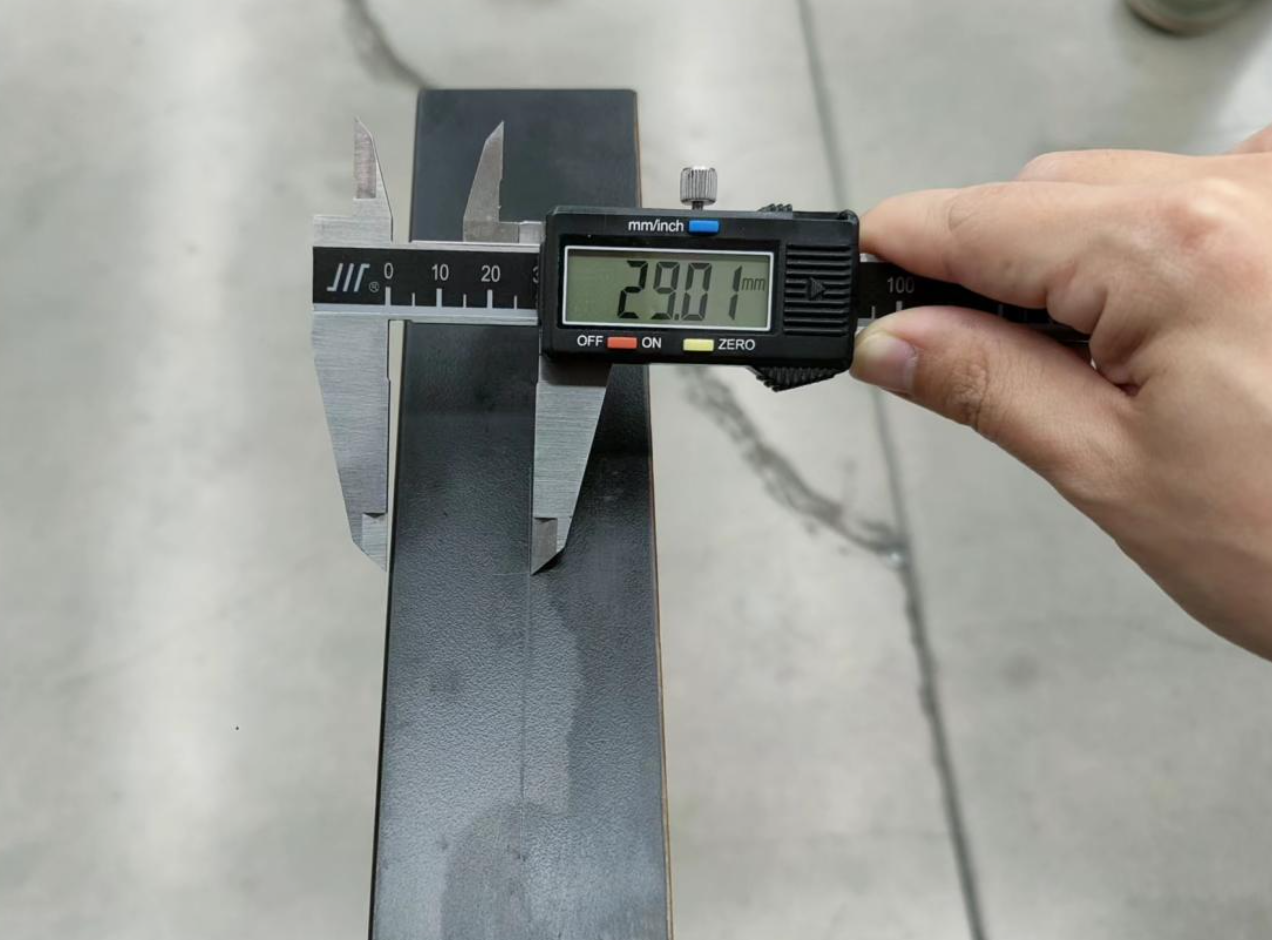
Hole Drilling — Extension TableFig. 1
Fig 1 hole drilling extension table
Hole Locations — DetailFig. 2
Fig 2 hole locations detail
Hole Height ReferenceFig. 3
Fig 3 hole height reference
Three-Hole Pattern — 52″ ExtensionFig. 4
Fig 4 three hole pattern 52 inch extension
Screw Orientation — Extension TableFig. 5a
Fig 5a screw orientation extension table
Screw Orientation — Cast Iron WingsFig. 5b
Fig 5b screw orientation cast iron wings
Rear Guide Rail Screw Specifications & PositionsFig. 8
Fig 8 rear guide rail screw specifications
Rail Height — 11.5mm Below TabletopFig. 9
Fig 9 rail height 11.5mm below tabletop
Final Front Rail Installation ResultFig. 10
Fig 10 final front rail installation result
Rear Rail
Rear Rail Installation

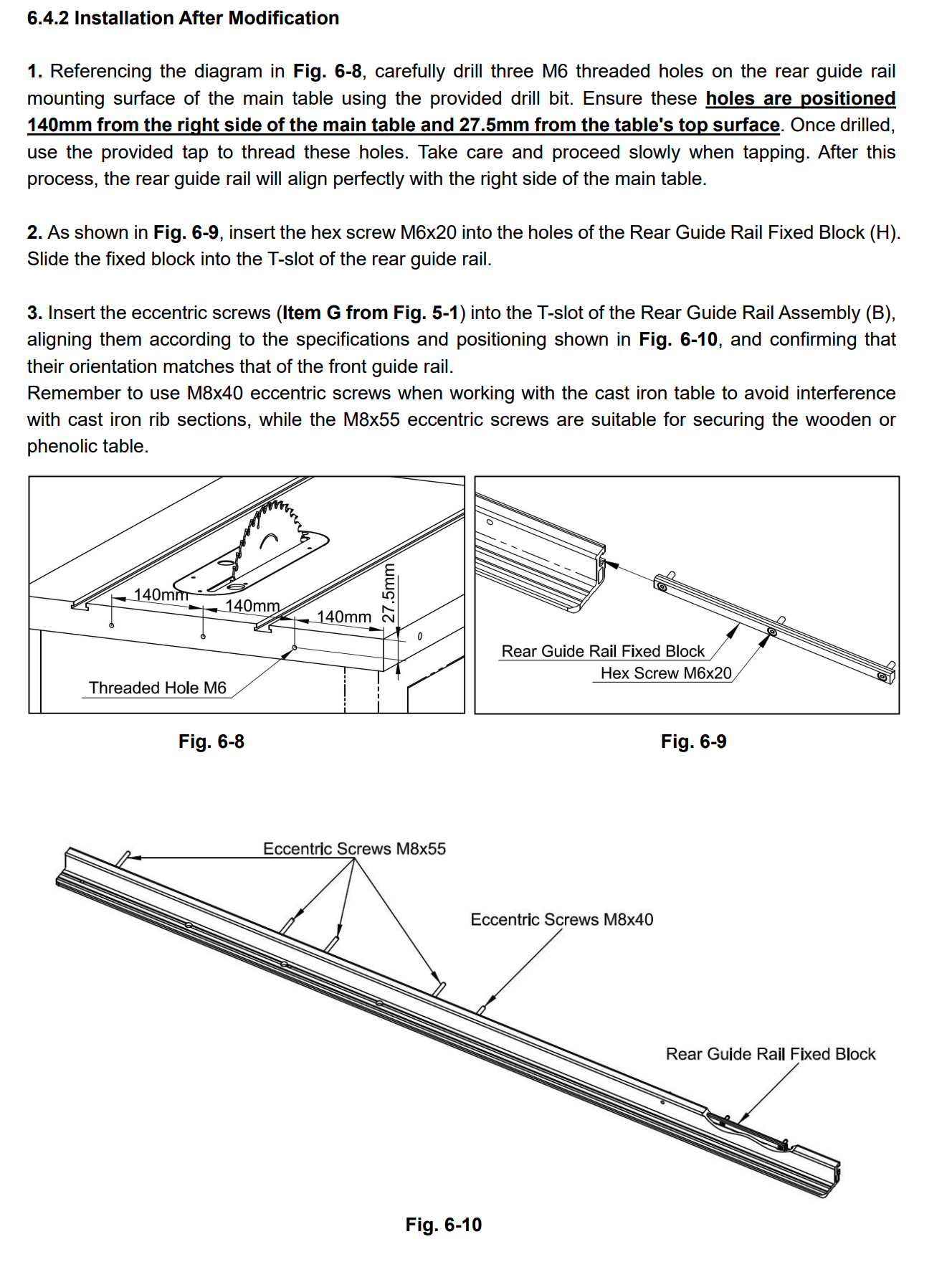
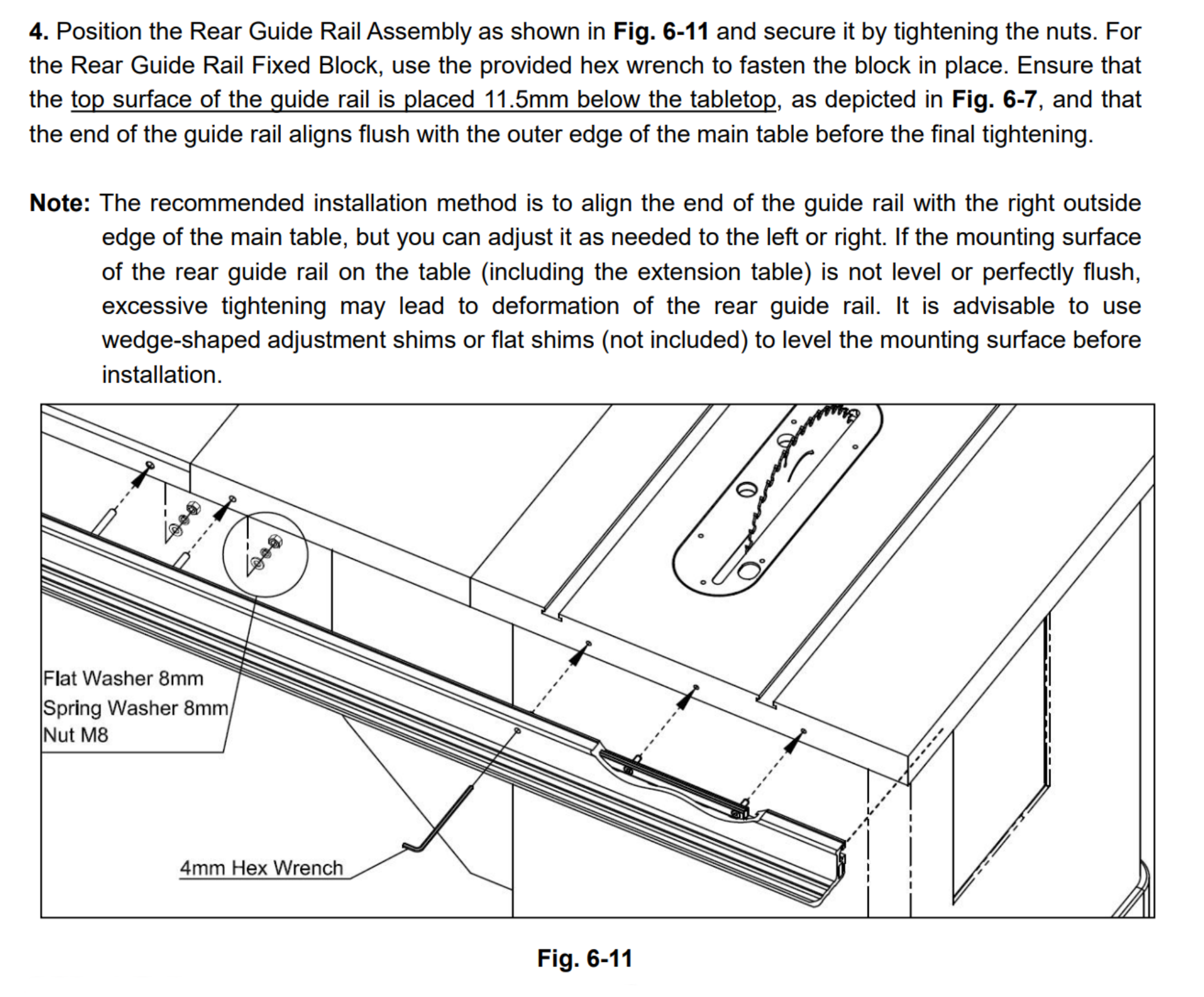
Repeat the same procedure for the rear rail. Refer to the user manual for detailed diagrams and explanations regarding direct installation or modification-based installation depending on your specific SawStop model.

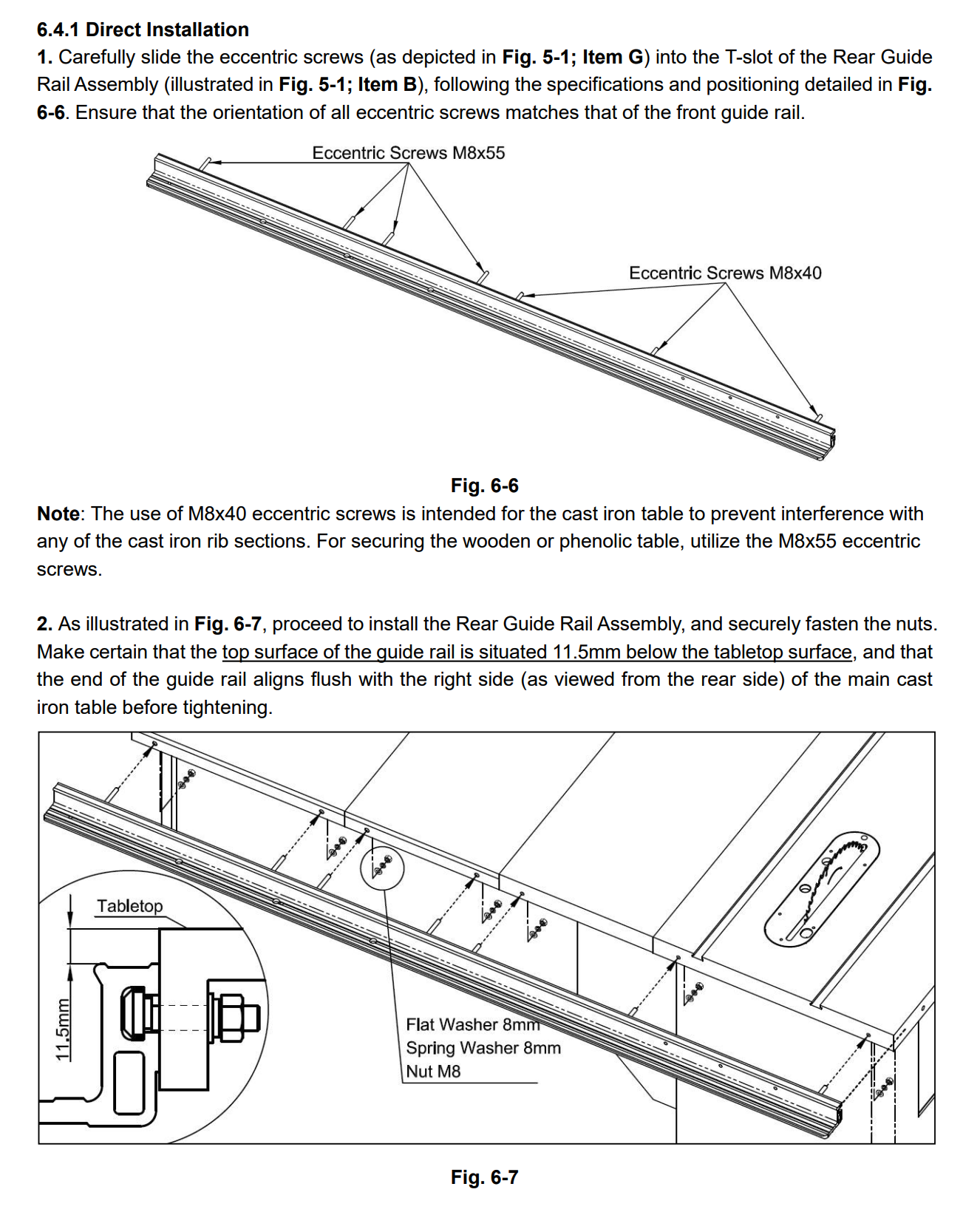
Rear Rail Installation — Reference (View 1)
Rear rail installation reference view 1
Rear Rail Installation — Reference (View 2)
Rear rail installation reference view 2
Rear Rail Installation — Reference (View 3)
Rear rail installation reference view 3
Rear Rail Installation — Reference (View 4)
Rear rail installation reference view 4
Extension Table Leg Installation

Legs for the ICS/PCS can be mounted after making modifications to accommodate the leg support brackets. Several options are available:

1
Use the rail mounting bolt holes to secure the leg support brackets to the rear rail, and repeat the same approach for the front rail.
2
For the front rail, use M5 square nuts and screws in the T-slot under the rail to mount the leg brackets.
3
Purchase a set of Harvey extension table legs and mount them to the end of the extension table by drilling through holes for mounting.
i

For help with your specific SawStop model or installation questions, please contact our support team.

Was this article helpful?

That’s Great!

Thank you for your feedback

Sorry! We couldn't be helpful

Thank you for your feedback

Let us know how can we improve this article!

Select at least one of the reasons
CAPTCHA verification is required.

Feedback sent

We appreciate your effort and will try to fix the article