Motor Capacitors: Troubleshooting & Replacement

Created by Gabriel Izzo, Modified on Thu, 21 May at 4:38 PM by Gabriel Izzo

Harvey FAQ · Power & Electrical
Motor Capacitors — Troubleshooting & Replacement
Capacitor & Electrical Safety — Read First
+
Disconnect the machine from power before servicing the motor or touching any electrical components. Never work on the motor while it is connected to a power source.
+
Allow a minimum of 10 minutes for internal capacitors to discharge after disconnecting from power. Capacitors store electrical charge and can deliver a dangerous shock even after the machine is unplugged.
+
Always verify that voltage has fully dissipated using a properly rated multimeter before touching any internal components or capacitor terminals.
+
Short across the capacitor terminals with an insulated-handle screwdriver to safely remove any remaining stored charge before testing or handling the capacitor.
+
Wear rubber-soled footwear and insulated gloves when working near any electrical components. Keep the work area dry at all times.
+
Consult a licensed electrician if you are unsure about any aspect of this procedure. Do not attempt electrical repairs beyond your competency level.
Removing the Capacitors from the Motor Housing

Both the start and run capacitors are located in the capacitor covers on the outside of the motor housing. To more easily access the capacitor cover screws, the saw can be tilted to one side to provide screwdriver clearance.

1

Slightly loosen two of the screws on one side of the capacitor cover — do not remove them fully. Then completely remove the two screws on the opposite side. This allows the cover to slide over and be removed while keeping the loosened screws in place for easy realignment during reinstallation.

2

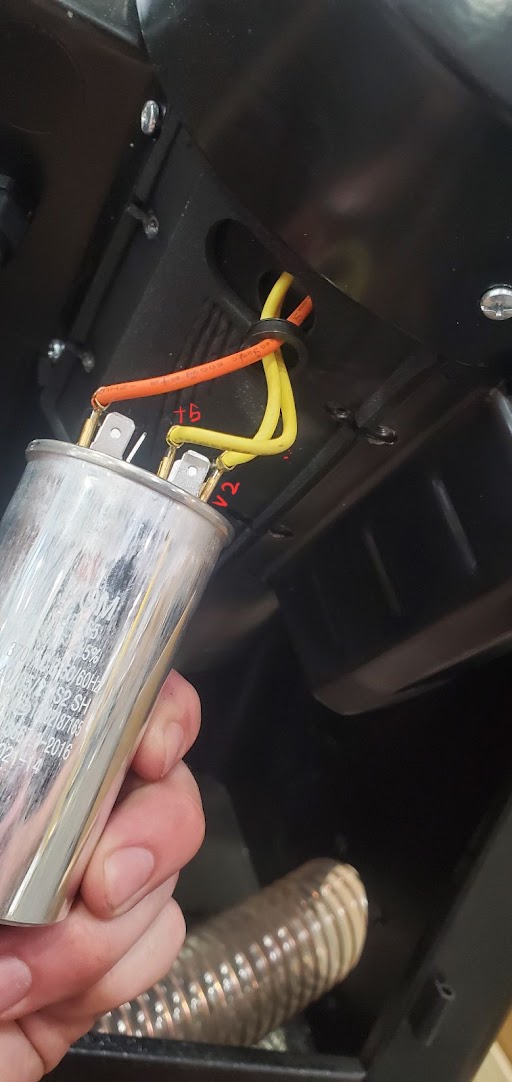
Once the capacitor is free from the cover, remove the wire connectors from the capacitor tines/prongs. Using a pair of pliers to pull the wire connections off the prongs may make this easier.

Note — Soldered Wires

Some capacitors have wires that are soldered directly to the capacitor terminals rather than using push-on connectors. If this is the case, the wires will need to be carefully cut and then resoldered to the terminals on the new capacitor. See the Soldering Instructions section below for a full procedure.
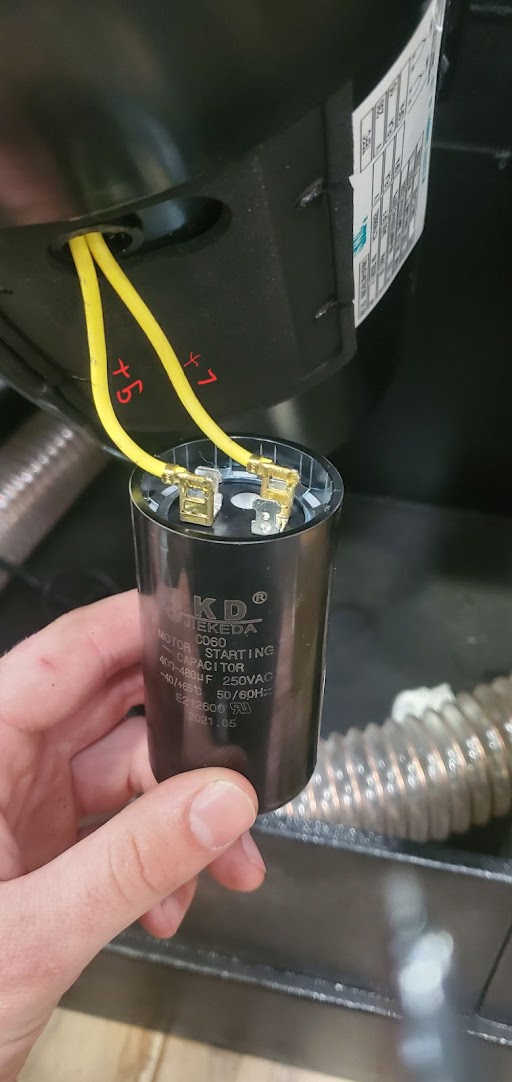
Capacitor Cover Removal (View 1)
Capacitor cover removal view 1
Capacitor Cover Removal (View 2)
Capacitor cover removal view 2
How to Test a Capacitor
WikiHow — How to Check a Start Capacitor
wikihow.com  ·  Complete instructions for safely testing start and run capacitors
 
Test your capacitor using a high-quality electrical meter capable of reading microfarads (µF / mfd).
Capacitors are labeled with their rated microfarad value. If the meter reads a value that is too high or too low compared to the label, the capacitor is likely faulty.
Before testing, short across the terminals with an insulated-handle screwdriver to discharge any remaining stored power.
The capacitor value must fall within the labeled tolerance range to be considered functional.
If the capacitor has more than two wires, wires that are paired together on one side must always remain paired together during reinstallation.
Soldering Wire to Capacitor Terminals
For non-polarized capacitors on TEFC motors

When soldering wires to a non-polarized capacitor on a TEFC motor, strip back approximately 1/4" to 3/8" (6–10 mm) of insulation — just enough for a solid mechanical and electrical connection without leaving excessive exposed conductor.

Too Much Stripped Wire Can:
Increase the risk of short circuits
Create a weak, unsupported wire section
Make heat shrink tubing or insulation harder to apply cleanly
Soldering Safety
+
Work in a well-ventilated area. Solder fumes — especially from rosin-core flux — are respiratory irritants. Use a fume extractor or fan directed away from you, and avoid breathing smoke directly.
+
Wear safety glasses. Solder can spit or splatter when it contacts flux or moisture. Eye protection is essential.
+
Never touch the soldering iron tip. Soldering iron tips operate at 300–450°C (570–840°F) and will cause severe burns instantly. Always use a proper iron holder or stand.
+
Keep a clean, uncluttered work surface. Keep flammable materials away from the soldering area. Do not set a hot iron down on unprotected surfaces.
+
Wash hands after soldering. Traditional solder may contain lead. Even lead-free solder involves flux chemicals — wash hands before eating, drinking, or touching your face.
+
Ensure power is disconnected from the machine before soldering any capacitor connections. Never solder live circuits.
1
Disconnect Power
Unplug and fully isolate the motor from power.
If replacing an existing capacitor, discharge it safely first using an appropriate resistor or discharge tool.
2
Strip the Wire
Strip approximately 1/4"–3/8" (6–10 mm) of insulation.
Avoid nicking or cutting conductor strands.
3
Twist the Strands
Twist stranded wire tightly so it stays compact before tinning or inserting into the terminal.
4
Tin the Wire (Recommended)
Apply a small amount of solder to the stripped wire end before attaching to the terminal.
This prevents strand fraying and improves solder flow at the joint.
5
Prepare the Capacitor Terminal
Solder tabs: lightly tin the tab first before applying the wire.
Eyelets / holes: feed the wire through the hole and wrap it slightly around the eyelet before soldering to create a mechanical connection first.
6
Make the Connection
Heat the terminal and wire together with the iron tip.
Feed solder into the joint — not directly onto the iron tip.
Allow solder to flow smoothly and fully wet the connection before removing heat.
7
Avoid Excessive Heat
Do not hold the iron on the capacitor terminal for extended periods.
Excessive heat can damage the capacitor's internal seals or dielectric material.
8
Inspect the Joint

A good solder joint should appear:

Shiny, smooth, and solid
Avoid dull or blob-like "cold solder joints" — these indicate poor heat application and will create an unreliable connection.
9
Insulate the Connection

Cover the completed joint using one of the following:

Heat shrink tubing
Insulating boots
High-quality electrical tape or self-amalgamating tape
No bare conductor should remain exposed after insulation is applied.
Secure the Wiring
Ensure wires are strain-relieved and not vibrating against the motor housing — TEFC motors produce significant vibration over time.

For a non-polarized motor capacitor, wire orientation typically does not matter electrically — unlike polarized electrolytic capacitors.

Solder type: always use rosin-core electrical solder only. Avoid acid-core or plumbing solder — it corrodes electrical connections over time.

Replacing the Capacitors
1

New capacitors will be labeled as start and run and will be different physical sizes. When installing both, connect the wire connections to each tine on the same sides they were installed from the factory — use the labeling on the capacitor as a left-to-right reference.

2

Once the capacitors are fully connected, place the capacitor cover gaskets and covers back in position. Use the two screws left loosely installed to easily align the cover, then fasten all four screws.

Test the motor by reconnecting power and attempting to start the machine. Verify that the motor starts and runs normally without buzzing, hesitation, or unusual sounds.

If the motor still does not start or runs abnormally after replacing the capacitors, there may be an additional issue. Please contact our support team for further assistance.
i

For help sourcing replacement capacitors or further electrical troubleshooting, please contact our support team.

Was this article helpful?

That’s Great!

Thank you for your feedback

Sorry! We couldn't be helpful

Thank you for your feedback

Let us know how can we improve this article!

Select at least one of the reasons
CAPTCHA verification is required.

Feedback sent

We appreciate your effort and will try to fix the article