Alpha HW615/Ambassador C14 Bandsaws: How to Reset the Upper Flywheel
Created by Hung Nguyen, Modified on Thu, 21 May at 9:46 AM by Gabriel Izzo
If you're experiencing issues with the upper flywheel — such as rubbing against the chassis, refusing to tilt, failing to track the blade correctly, or binding during tensioning — this guide will walk you through how to reset it to its default working position. Both the Ambassador C14 and Alpha HW615 share a similar upper wheel and tilt system.
Remove the blade entirely. Also remove the upper blade guard to gain full access to the wheel area.
If the flywheel is tilted and rubbing the chassis, reset its angle using the pivot axis:
Locate the two nylon lock nuts that secure the flywheel's pivot block to the frame on both sides of the upper assembly. Loosen them very slightly — just enough to relieve pressure and allow the flywheel block to shift or pivot freely.
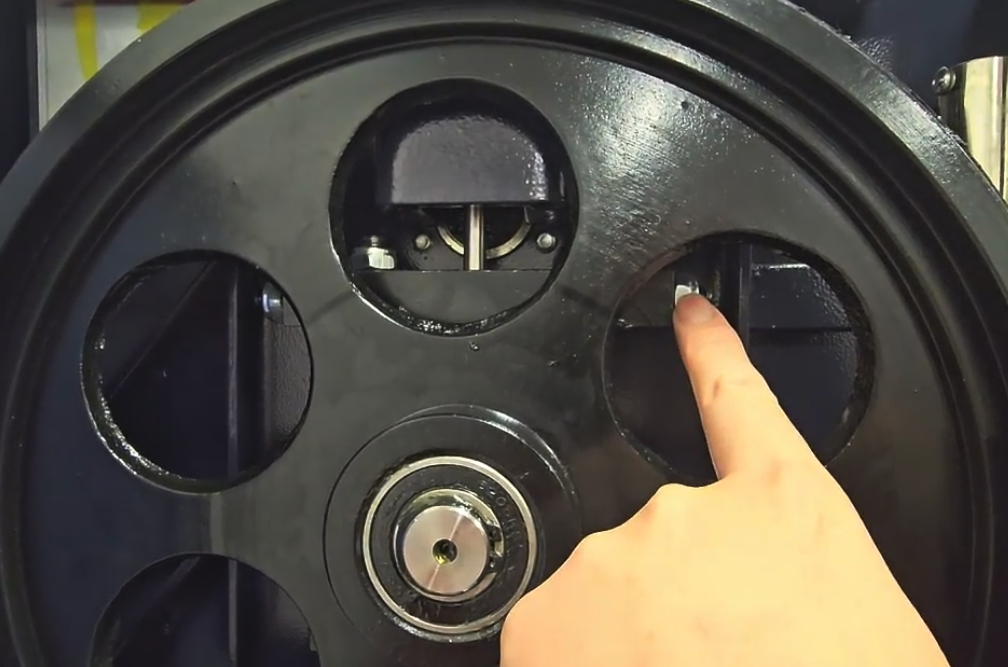
Once reset, the wheel should rotate freely and be able to move up and down on its vertical guide rods (without a blade installed). Gently lift and rotate the wheel by hand to confirm it is no longer contacting the chassis frame.
Be cautious with the tensioning indicator needle — moving the wheel too high or too low can cause the needle to fall off the tensioner block assembly inside the upper housing. If that happens:
Contact support and ask for the "Tensioning Needle Reset" video if needed.
Re-install the blade, then re-tension it before proceeding to tracking adjustment.
If the tensioning knob becomes stuck, it may be due to a jammed nut or disc. Try using a pair of adjustable pliers — use a towel to protect the nut from being marred.
If anything feels bound, stop and check alignment, screws, or contact our support team before proceeding.
If the issue persists after following these steps, please contact our support team.
Was this article helpful?
That’s Great!
Thank you for your feedback
Sorry! We couldn't be helpful
Thank you for your feedback
Feedback sent
We appreciate your effort and will try to fix the article