Gyro Air G-700: Troubleshooting F85 External Fault Code - Siemens Inverters Only

Created by Gabriel Izzo, Modified on Tue, 19 May at 3:37 PM by Gabriel Izzo

Gyro Air G-700 · Troubleshooting
F85 External Fault Code — Siemens Inverter Only
Applicable Model
Gyro Air G-700 — Siemens Inverter Models Only

The Siemens version of the G-700 — identified by the Siemens logo on the screen and a Siemens inverter inside the electrical box — may display an F85 External Fault.

What Does F85 Mean?

The inverter is expecting a signal from one of the external accessories but is receiving the wrong signal — or no signal at all. The two accessories that can trigger this fault are:

!
The dust bin photoelectric sensor
!
The remote control receiver (RC-700, if installed)
Electrical Safety — Read Before Proceeding
+
Ensure the machine is OFF and unplugged. Disconnect from power and allow a minimum of 10 minutes for internal VFD capacitors to fully discharge before accessing the electrical box. Always verify voltage has dissipated using a properly rated multimeter before touching any internal electrical components.
+
Turn the main power switch to OFF before removing the electrical box cover — it will be locked if the switch is ON.
+
Verify no power is present by attempting to start the machine after unplugging before touching any internal components.
Cause 1
Dust Bin Sensor

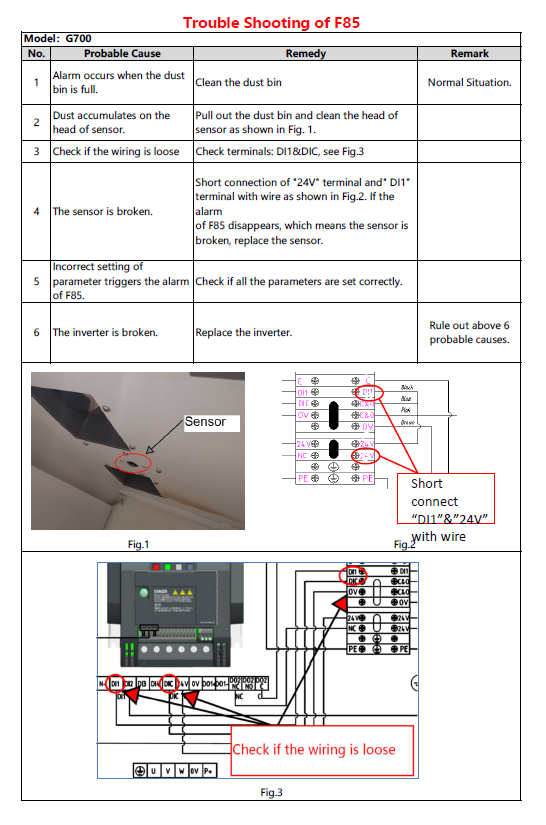
When the F85 fault is caused by the dust bin sensor, the sensor may be detecting a full dust bin, or dust buildup may be coating the sensor lens and triggering a false alarm.

1
Clean the sensor lens to remove any dust buildup.
2
Confirm the dust bin is not actually full. Empty and replace the liner if needed.
3
Inspect the sensor wiring where it runs through the external metal bracket between the separators. Ensure the connection is not loose.
Tip: Before replacing the sensor, confirm the issue is not related to the remote receiver wiring (see Cause 2 below).
Dust Bin Sensor — Location Reference
Dust bin sensor location reference diagram
Cause 2 — RC-700 Installed Only
Remote Control Receiver

The F85 code can also be triggered by the remote receiver. This applies only if your G-700 is equipped with the RC-700 remote control and receiver. Possible causes include:

!
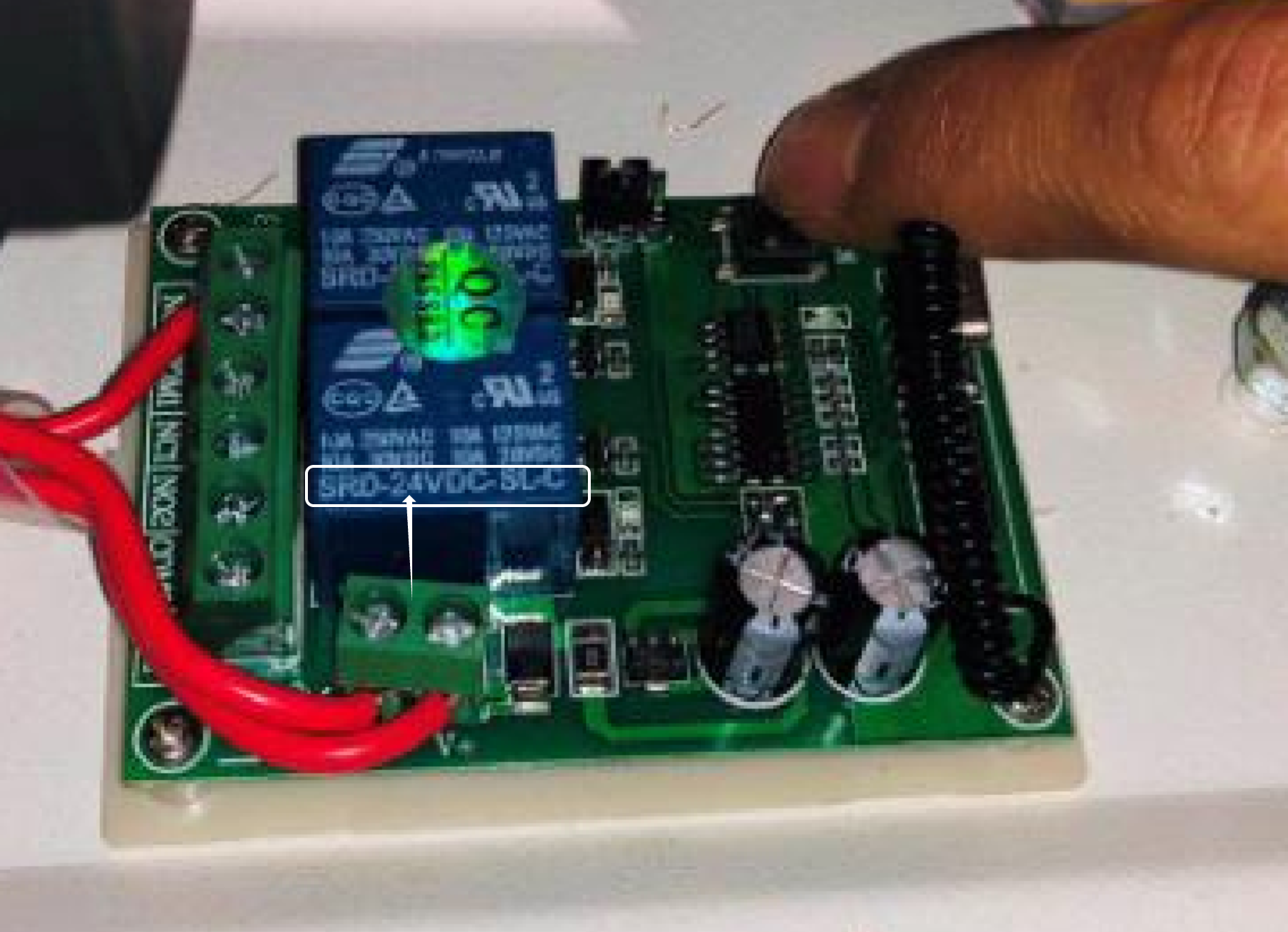
Wrong receiver voltage installed (12V vs. 24V)
!
Incorrect installation
!
Loose wiring at the receiver, terminals, screen connection, or inverter
Receiver Location

Depending on your machine version, the receiver may be:

Inside the electrical box, or
Mounted externally on the right side of the electrical box near the main power switch.

To inspect, remove the adjacent panel as well as the rear panel and switch cover to access the wiring terminals.

Verify Receiver Voltage
Siemens G-700 24V receiver
Inovance G-700 12V receiver

Look at the black square relays on the receiver board — they are labeled with either "12" or "24". If a Siemens G-700 shows a 12V relay, the wrong receiver is installed and must be replaced with a 24V unit.

Check Wiring Connections

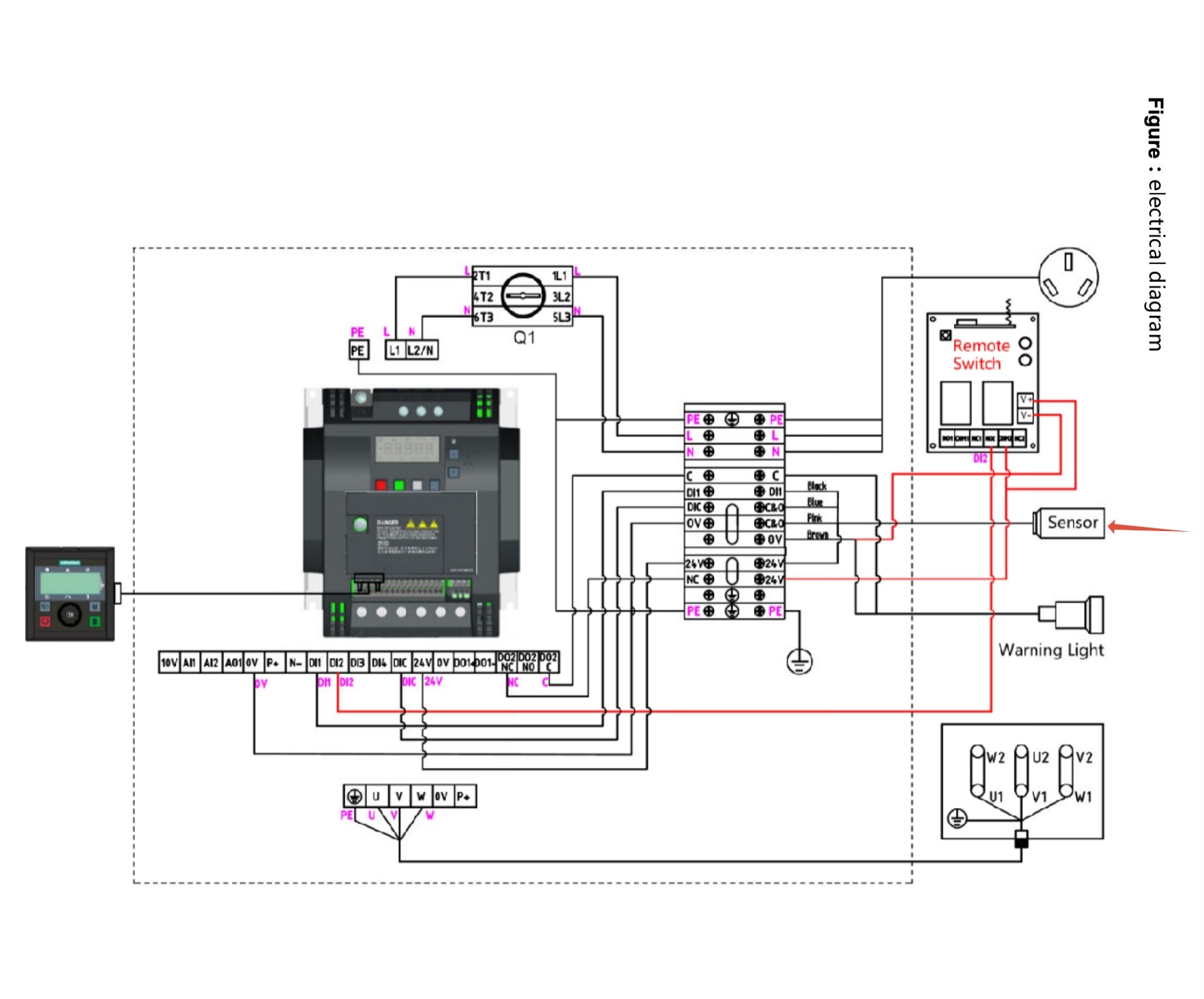
If the receiver voltage is correct, inspect all wiring connections throughout the system:

Inspect all wiring at the electrical box, receiver, terminal block, screen, and inverter.
Lightly tug each connection to confirm it is seated securely.
Confirm the sensor wiring is not loose or pinched.
Wiring Reference — Fig. 1
Wiring reference diagram 1
Wiring Reference — Fig. 2
Wiring reference diagram 2
If the Issue Persists

The problem may be related to inverter parameters, faulty wiring, or a defective sensor. Refer to the RC-700 manual below for wiring and parameter setup, or contact our support team.

 PDF RC-700 Remote Control & Receiver Manual  
i

If these steps do not resolve the issue, please contact our support team.

Was this article helpful?

That’s Great!

Thank you for your feedback

Sorry! We couldn't be helpful

Thank you for your feedback

Let us know how can we improve this article!

Select at least one of the reasons
CAPTCHA verification is required.

Feedback sent

We appreciate your effort and will try to fix the article