Riving Knives: Alignment Overview with Example
Created by Gabriel Izzo, Modified on Fri, 22 May at 5:49 PM by Gabriel Izzo
If your riving knife is not centered with the blade, you may need to adjust the riving knife mounting bracket. This article covers key considerations to make the adjustment easier, followed by a real step-by-step example with photos showing how to diagnose and correct misalignment.
When raising the blade to full height, be careful not to over-tighten the handle. Forcing the blade too far up can cause both the blade and riving knife to cant to one side, making proper alignment impossible. Try backing off slightly from max height and rechecking alignment.
Slowly raise and lower the blade using the crank handle while watching both the blade and riving knife. If the knife shifts side-to-side as you change direction, there may be excess play in the mounting bracket. Document this movement and contact support — it helps us understand why the knife is falling out of alignment.
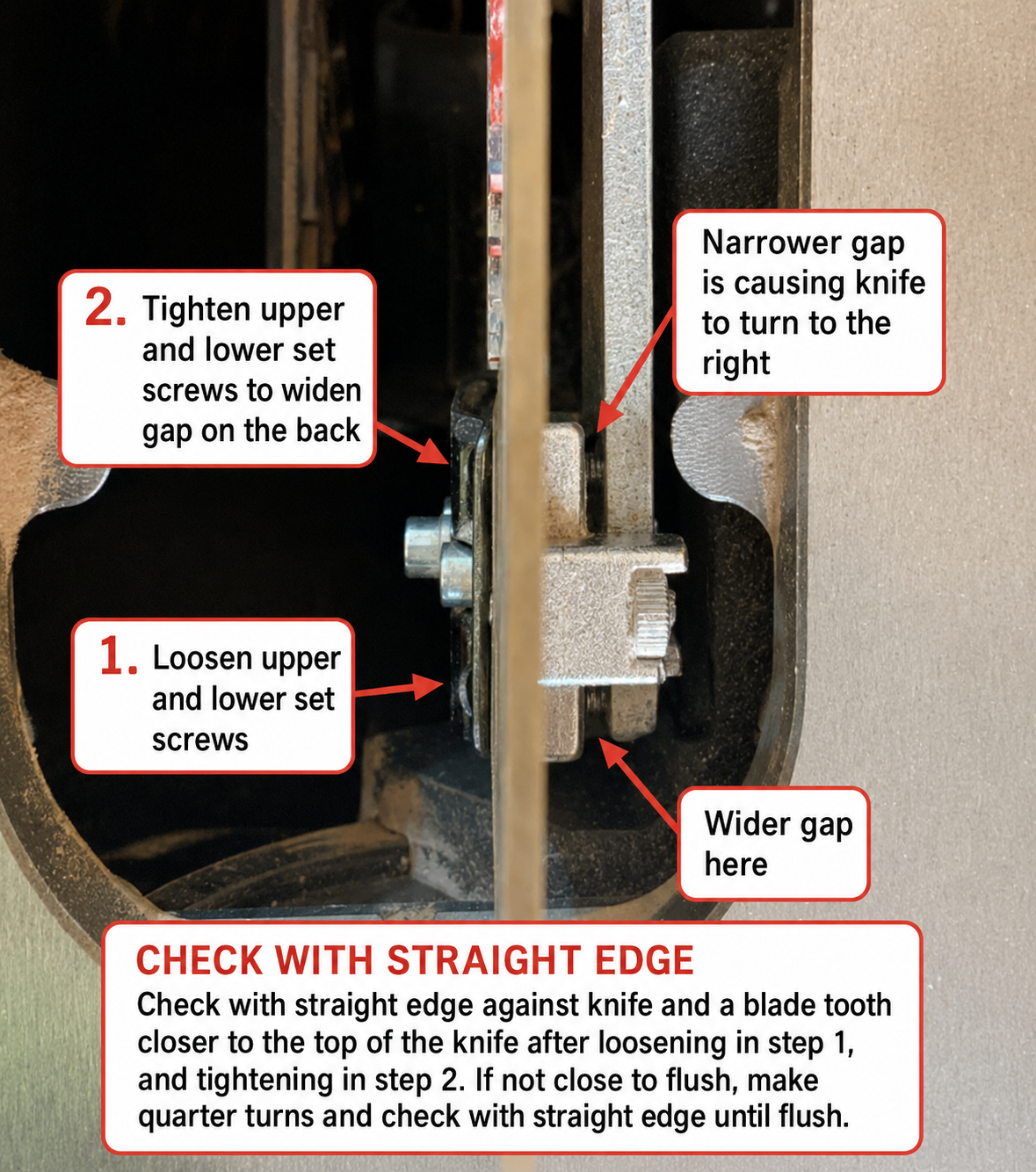
In this example, the misalignment is caused by the set screws closest to the blade not being threaded in far enough, creating a narrower gap on one side of the bracket. The screws on the opposite side are threaded in more, creating a wider gap — causing the knife to angle to the right. The steps and photos below demonstrate how to diagnose and correct this.
The next two photos demonstrate the misalignment — the riving knife is angled to the right of the blade. A straight edge placed against the body of the knife and a tooth of the blade reveals a visible gap on both sides.


Loosen both the upper and lower cap screws in the center of the bracket (highlighted in green in Fig. 27). Then slightly loosen both upper and lower set screws on the rear side of the bracket (facing from the front of the saw) so there is no tension on them. Leave them slightly loose until the front set screws are adjusted in the next step.

Tighten both the upper and lower set screws on the front of the bracket (closest to the blade) a quarter to half turn to widen the gap that was previously narrower. Check with a straight edge to see if the riving knife is starting to straighten out with the blade teeth.

Once it appears aligned, check both sides with a straight edge against the riving knife and the blade teeth. The goal is to get the knife as centered as possible with an even gap on both sides.

If you went slightly too far in step 2 and the gap is now too wide on the opposite side, back the front set screws out 1/8 to 1/4 turn counter-clockwise. Make only minor adjustments and check with the straight edge after each one.

Once the knife is centered, tighten the upper and lower cap screws in the center of the mounting bracket that were loosened in step 1. Check again that the riving knife is still aligned with the blade. The following photos show the correctly aligned result.


This completes the alignment procedure. The riving knife should now be centered with the blade. Always verify alignment after any blade change or height adjustment.
If you continue to experience alignment issues, please contact our support team.
Was this article helpful?
That’s Great!
Thank you for your feedback
Sorry! We couldn't be helpful
Thank you for your feedback
Feedback sent
We appreciate your effort and will try to fix the article