Ambassador C14 Band Saw: Troubleshooting Motor Not Starting When Connected to Power

Created by Gabriel Izzo, Modified on Tue, 19 May at 10:57 AM by Gabriel Izzo

Ambassador C14 Band Saw · Troubleshooting
Motor Not Starting When Connected to Power
Applicable Model
Ambassador C14 Band Saw

Experiencing issues with your machine not starting can often be traced back to the activation of one or more safety killswitches, which open the circuit and prevent power from reaching the motor. Follow the steps below to diagnose and resolve the issue.

Electrical Safety Warning
+
Disconnect the band saw from the power source before performing any maintenance, adjustments, or inspections of internal components.
+
Confirm the machine is OFF and fully discharged before adjusting the Brake Lever Switch or any other electrical components.
+
Never touch internal electrical components directly — use an insulated object such as a dry wooden strip when testing the bypass button.
+
If these steps do not resolve the issue, do not attempt further electrical repairs yourself — contact a qualified technician or our support team.
Troubleshooting Steps
1
Check the Emergency Stop and Brake Switch
A
Emergency Stop

Ensure the Emergency Stop switch is fully disengaged. If this switch is engaged it will prevent the machine from starting.

B
Brake Lever Switch

Located above the brake lever, this switch must be fully engaged for the machine to operate.

2
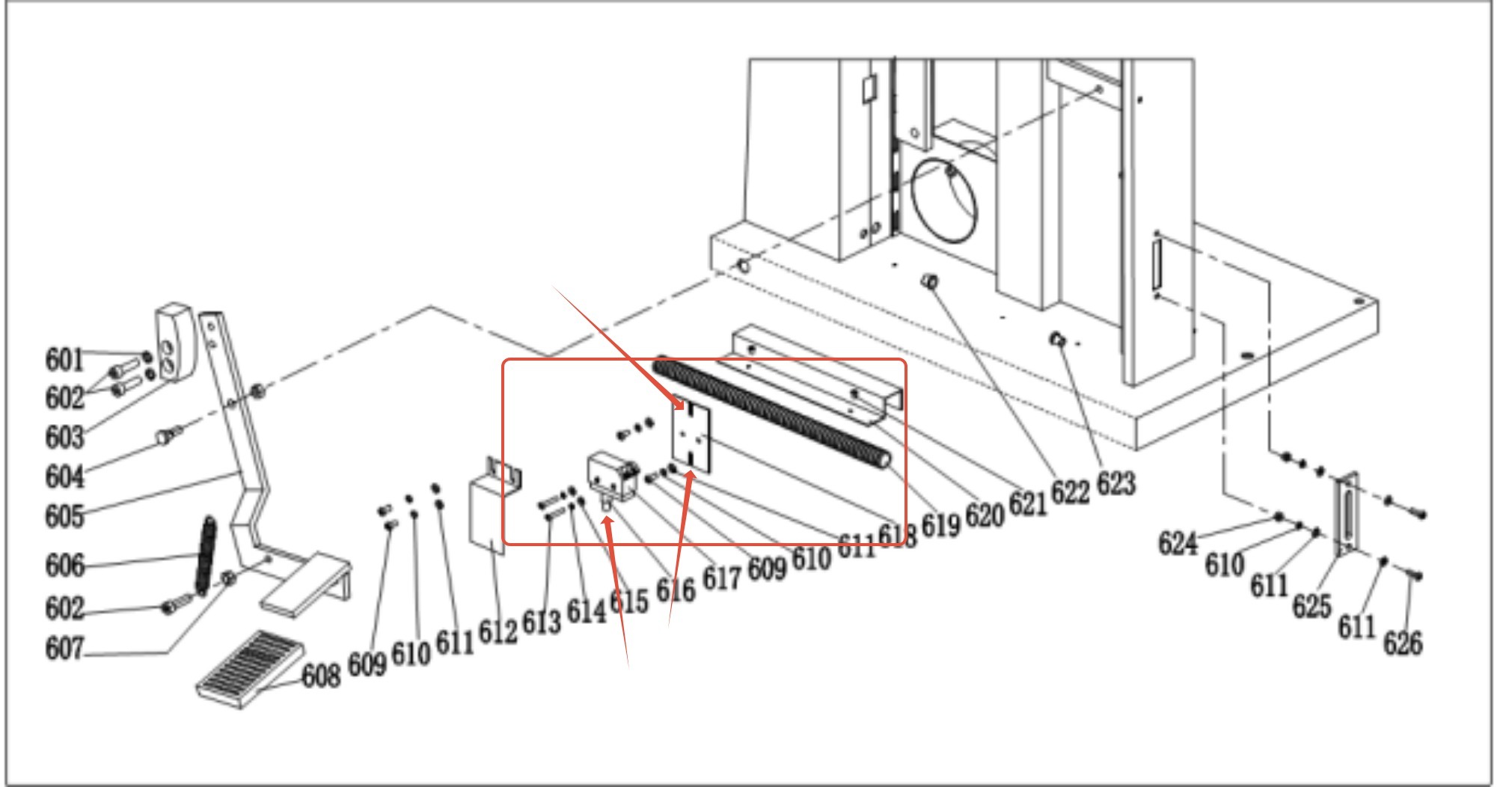
Adjust the Brake Switch Mounting Plate

If the machine still fails to start after Step 1, check the brake switch mounting plate position:

1
Check if the mounting plate for the brake switch is positioned too high. If so, the pin may not be pushed in far enough to engage the brake's safety switch.
2
Loosen the mounting screws and adjust the plate slightly lower so it engages properly with the foot pedal in its resting position.
3
Retighten the screws and attempt to start the machine.
Step 2 — Brake Switch Mounting Plate Location Fig. 1
C14 brake switch mounting plate location
3
Bypass Test

If the machine remains non-operational after Steps 1 and 2:

1
Open the electrical box lid and locate the blue bypass button.
2
Use an insulated object — such as a dry wooden strip — to press the bypass button. Never use bare hands or a metal object.
3
If the machine starts with the bypass button, the issue lies with one of the killswitches or the Emergency Stop — further troubleshooting of those components is needed.
4
If the machine still does not start, the problem may be related to the power supply or the contactor itself — contact our support team for further assistance.
Step 3 — Blue Bypass Button Location in Electrical Box Fig. 2
C14 electrical box with blue bypass button location highlighted

By methodically working through these steps you should be able to diagnose the starting issue. If none of these steps resolve the problem, further investigation of the machine's electrical system is required and we recommend contacting our support team before proceeding.

i

If these steps do not resolve the issue, please contact our support team for further assistance.

Was this article helpful?

That’s Great!

Thank you for your feedback

Sorry! We couldn't be helpful

Thank you for your feedback

Let us know how can we improve this article!

Select at least one of the reasons
CAPTCHA verification is required.

Feedback sent

We appreciate your effort and will try to fix the article